Showing posts with label Google Goggles. Show all posts

Continuous Mode in Google Goggles

Wednesday, December 7, 2011 0 comments
Google Goggles for Android has a new mode that lets you find information about objects without manually taking pictures. Just enable the continuous mode and Goggles will automatically analyze the scene, upload the photos to Google's servers and show the results at the bottom of the screen. "Continuous mode is a quick and easy new way to use Goggles. You can now get results instantly without having to take a picture - no shutter press required! Goggles will scan the scene continuously so you don't need to worry about taking multiple pictures. The new continuous mode works best with books, products, artwork, and landmarks," explains Google. For now, Goggles can't detect text in the continuous mode, so you need to switch to the snapshot mode to translate a text, find an address or call a phone number.


The "live" mode is useful if you want to scan many barcodes or if you want to find information about many objects without spending a lot of time taking the perfect photos. Goggles is still far from perfect, so it will sometimes detect a lot of incorrect objects. You'll need a fast Internet connection, good lighting and an Android phone with a decent camera. Unfortunately, the application doesn't save its findings. While it's obvious that cluttering the history is not a good idea, saving the list of detected objects to a temporary page would be really useful.

Google Goggles 1.7 also adds a feature that returns pages which include the text you've scanned, even if it's a long text. This is especially useful for news articles. Now you can quickly find the online version of the content you're reading.


You can improve Goggles by adding information about the objects you know. Tap "can you suggest a better result?", draw a box around the object and describe the object. "To date, hundreds of thousands of submissions have been made to improve Goggles. Starting today, if you choose to suggest a better result or submit a new object altogether, your suggestion could become a result for the next user who searches for a similar object with Goggles," informs Google.

If you have a device that runs Android Gingerbread, Honeycomb or Ice Cream Sandwich, install Goggles from the Android Market or update to the latest version. According to Google, about 50.6% of the Android devices run Gingerbread and 2.4% of the devices run Android Honeycomb.

Google Goggles Makes Your Phone's Camera Smarter

Wednesday, September 14, 2011 0 comments
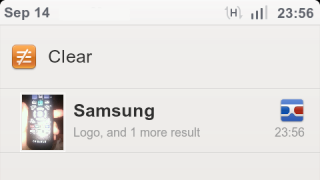
Google Goggles is an application that's sometimes useful, but it's not good enough to use it every time you want to find something about an object. The Android app has a new feature that integrates it with the Camera app, uploads all the photos you're taking to Google's servers and shows notifications in the status bar if Goggles found something useful. It may sound spooky, but it makes your phone's camera smarter.

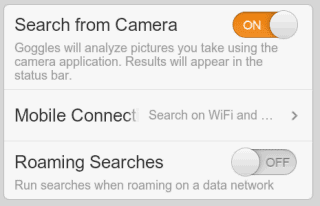
"With this new opt-in feature in Goggles, you can simply photograph an image using your phone's camera, and Goggles will work in the background to analyze your image. If your photo contains items that Goggles can recognize, the app will notify you," explains Google. The feature is disabled by default, but you can enable it from the settings page by choosing "Search from Camera".


It's probably a good idea to only enable this option when you're on vacation or when you're planning to photograph barcodes for products you want to buy. It's also useful if you're in a bookstore and you want to "bookmark" some books.

Google Mobile's help center informs that "each Goggles query consumes approximately 100 KB of data" and you can limit the amount of data that's consumed by selecting "Search on WiFi networks only" under "Mobile Connection".

"Search from Camera" is one of the features that won't be available in the Google app for iPhone because iOS' background APIs aren't that powerful. If you have an Android device, install Google Goggles 1.6 from the Android Market.

Google Goggles History

Thursday, January 13, 2011 0 comments
Until Google releases a desktop version of Google Goggles, you can see your previous visual queries at http://www.google.com/goggles/history even when you don't have your phone with you. Click on one of the images and you'll see the results, similar images and links to related web pages.


It's surprising to see that this service is not yet integrated with Google Web History and it's not part of Google Image Search.

{ spotted by François Beaufort }

Google Goggles Solves Sudoku Puzzles

Monday, January 10, 2011 0 comments
Google's visual search tool has a new trick up its sleeve: solving Sudoku puzzles. Google Goggles 1.3 for Android scans barcodes much faster, recognizes print ads from the major U.S. magazines and newspapers, but most people will probably ignore those useful features and will try to see if Goggles can actually solve Sudoku puzzles. The nice thing is that this feature also works in the latest version of Google Mobile App for iPhone, along with print ads recognition.

"Now, Goggles on Android and iPhone can recognize puzzles and provide answers to help make you faster than a Sudoku champ. So if you ever get stuck, take a clear picture of the entire puzzle with Goggles and we'll tell you the correct solution," explains Google.

Maybe providing a hint would also be useful, especially if you want to solve the puzzle.


The new features show that Google Goggles has a lot of potential, but it's still not useful enough in the real world. An interesting article from Xconomy quotes Hartmut Neven, Google's technical lead manager for image recognition, who says that Goggles is not yet an universal visual search tool. "What keeps me awake at night is, 'What are the honest-to-God use cases that we can deliver,' where it's not just an 'Oh, wow.' We call it the bar of daily engagement. Can we make it useful enough that every day you will take out Goggles and do something with it?"