Showing posts with label YouTube. Show all posts

YouTube's Snow Effects

Thursday, December 22, 2011 0 comments
If you liked Google's "let it snow" Easter egg, YouTube has some special effects for you. YouTube's player has a new button for snow, the progress bar includes a snowflake, while the search results page for queries like [snow] or [Christmas] use a simplified snow animation.


{ Thanks, Sterling, Venkat and Cookie Lee. }

No More Cosmic Panda

Friday, December 16, 2011 0 comments
When YouTube launched the new interface, it was obvious that Cosmic Panda was just an experiment and its purpose was to test some new features. Now Cosmic Panda is no longer available and users have been switched to the regular interface.

"Yesterday marked the last day of the channels and watch experiment, otherwise known as Cosmic Panda. Contrary to what some might have thought, Cosmic Panda was not the new version of YouTube to come, but just an experiment we used to test out some new and interesting ideas. Since launching the experiment in July, we learned a lot and incorporated many results of the experiment into our recent homepage and channels update, which you're using now. We're happy with what we found and are now bringing Cosmic Panda to a close," informed a Google employee.

More About YouTube's Latest Experimental Interface

Thursday, December 1, 2011 0 comments
A week ago, I reported that YouTube tests a new interface based on Cosmic Panda. The most important feature is the redesigned homepage that helps you find new channels and explore the videos from your subscriptions. YouTube started to post additional information about the new interface and it's now obvious that it will replace existing UI in the near future (the link only works after you've enabled the new interface).

"We've given YouTube a refresh. When you login, you'll be greeted with recent activity from your subscriptions. You can also browse and add new Channels to your homepage. Connect with Google+ and Facebook to share your favorites with friends. There's plenty to discover, so login and give it a spin."


There's also an article about the new interface for channels.

This new look and feel makes it easier for viewers to to find and watch content. It also makes it easier for Channel creators to organize and showcase exactly what they want. We incorporated your Feedback from the "Cosmic Panda" Channels and Watch experiment, and are excited to present:

* A more streamlined and consistent design
* An easier way to find and view videos
* New, more flexible layouts for featured content, and
* A way to keep your audience engaged even when you don't have new uploads

It's interesting to notice that the new homepage and the new channels are built around feed views and activity streaming to make YouTube even more social.


The new channels are less customizable: you can only choose an avatar, a background image, a background color and a template (creator, blogger, network, everything).


Update: The new interface is available for everyone.

YouTube Tests a New Homepage

Monday, November 21, 2011 0 comments
YouTube experiments with a new homepage that makes it easy to filter the videos from your subscriptions, social networks and your account from the homepage. YouTube calls the new homepage a guide, probably because it recommends new channels. There's even a page that lets you browse popular channels by category, including a list of recommended channels.

The nice thing about the new homepage is that you can click an option from the left sidebar and the corresponding videos are displayed without opening a new page. Now you can quickly access the list of videos you liked or your history, the latest videos from a channel and the most popular YouTube videos directly from the homepage. Unfortunately, the updated YouTube.com doesn't look great when you're not signed in since most features are missing and YouTube emphasizes the "sign in" button.


YouTube also updated video pages. The background is now light gray, just like on the homepage. Buttons are embossed, there are new icons for the buttons and for the full screen/larger player options.


To try the redesigned homepage and the updated interface of the video pages, edit the VISITOR_INFO1_LIVE cookie for youtube.com and use the following value: ST1Ti53r4fU. For example, in Google Chrome, go to YouTube's homepage, open the JavaScript console (Ctrl+Shift+J or Menu > Tools > JavaScript Console) and paste the following code:

document.cookie="VISITOR_INFO1_LIVE=ST1Ti53r4fU";

Then press Enter, close the console and reload YouTube's homepage.

You can also use extensions like Edit this cookie (Chrome) or Cookies Manager (Firefox). Opera's cookie manager is really advanced, so you don't need an extension to edit cookies.

To go back to the old interface, open your browser's cookie manager, search for youtube.com and delete the VISITOR_INFO1_LIVE cookie.

{ Thanks, Emerson and Mushaf.}

YouTube's HTML5 Player Gets Better

0 comments
YouTube's HTML5 player has improved a lot lately and it's almost ready to replace the Flash player. You can enable annotations and captions, the contextual menu lets you copy the embedding code and the video's URL, YouTube now offers 480p and 1080p options for WebM videos and there's native full-screen support if you use a Firefox nightly build or Chrome's dev channel.


I've also noticed that sometimes embedded videos use the HTML5 player even if you've already installed Flash and you haven't enabled the HTML5 trial.

YouTube's Google+ Player

Thursday, November 3, 2011 0 comments
Google+ added a small YouTube icon that's always displayed next to the scrollbar. When you mouse over the icon, you'll see a search box that asks you "what would you like to play?". Type your query and Google+ opens a pop-up window with 20 search results. It's actually a playlist and videos start playing automatically.


You can +1 a video you like or share it with your circles. When you share a video, Google also adds a link to a playlist with related videos.

The nice thing is that you can minimize the pop-up window and still be able to pause a video or go to the next video directly from Google+. This is especially useful for music.


"It's no secret that YouTube is filled with tons of great content (from inspiring speeches to music videos to honey badgers). We wanted to bring YouTube directly into Google+ — as well as make it easier to watch and share your favorites — so we're launching a YouTube 'slider' in the stream," mentions Google's Vic Gundotra.

What about a Google Music player?

{ Thanks, Thomas, Benjamin and Herin. }
YouTube Tests a New Interface

0 comments
YouTube experiments with a new interface that uses a gray background, muted colors, redesigned buttons and new icons for the like/dislike buttons. Most of the features are available in the Cosmic Panda experiment, but the changes are less drastic.


To try the new interface, change the value of the VISITOR_INFO1_LIVE cookie for youtube.com to Eg7GsyKWzk8. For example, in Google Chrome, go to YouTube's homepage, open the JavaScript console (Ctrl+Shift+J or Menu > Tools > JavaScript Console), paste the following code:

document.cookie="VISITOR_INFO1_LIVE=Eg7GsyKWzk8";

Then press Enter, close the console and reload YouTube's homepage.

You can also use extensions like Edit this cookie (Chrome) or Cookies Manager (Firefox). Opera has a powerful cookie manager, so you don't need an extension to edit a cookie.

To go back to the old interface, open your browser's cookie manager, search for youtube.com and delete the VISITOR_INFO1_LIVE cookie.

{ Thanks, Maurice. }

Connect YouTube with Google+

Saturday, October 15, 2011 0 comments
YouTube now lets you connect your Google+ account and watch the videos shared by your friends on YouTube's homepage. At the moment, AutoShare is not available and you can't automatically share activities like uploading a video, commenting on a video or liking a video.

To enable this feature, go to Settings > Sharing and click "Connect" next to Google+.


You'll have to wait a few hours until YouTube starts to show videos shared by the people you follow in Google+. Unfortunately, there's a significant delay and the videos aren't added in real time.


{ Thanks, Katty, Herin and Venkat. Via Nirav. }

YouTube's New Video Editor

Thursday, September 15, 2011 0 comments
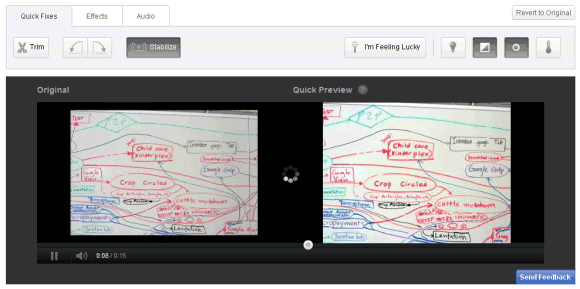
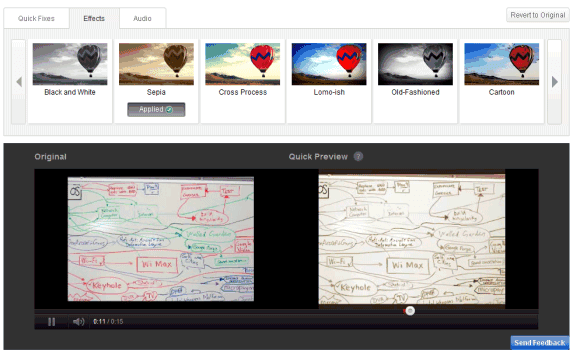
YouTube has a new online video editor that lets you trim the video, rotate it, remove shaky camera motions, adjust the contrast, saturation and color temperature, apply simple effects like "sepia", "cartoon", "thermal" and add a free audio soundtrack from YouTube's library.

While the editor is pretty basic, the main advantage is that you can replace the original video, but this only works if your video has less than 1,000 views and YouTube hasn't received a copyright complaint from a third-party. There's also a "save as" option that lets you save the edited version as a new video.


How to find the new editor? Make sure you're logged in, go to "My videos & playlists" and click "Edit video" next to the video you want to edit. You can also open a video you've uploaded and click "Edit video".


To make things more confusing, YouTube has another video editor that lets you mix your videos and Creative Commons videos from other YouTube users, add audio soundtracks from YouTube's library and apply transitions.

YouTube Cosmic Panda

Friday, July 8, 2011 0 comments
YouTube tests a new interface code-named Cosmic Panda. There are many cosmetic changes: videos are centered, player's controls are now black, video thumbnails are a lot bigger, suggestions are displayed below the video, profile photos are displayed next to the comments, channels and playlists have a completely new layout.


Probably the most interesting thing about the new interface is a Chrome-only feature that lets you play a video in the background while you visit a channel. YouTube is more fluid and I expect to see a similar feature when you perform a search and when you click "view all comments".

The new interface can be enabled and disabled at youtube.com/cosmicpanda.

{ Thanks, Jason and Greg. }

Quickly Add a YouTube Video to a Playlist

Wednesday, July 6, 2011 0 comments
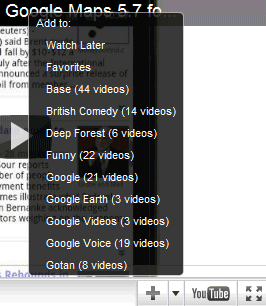
YouTube's embeddable player added a new feature that lets you quickly update your playlists with new videos. Click the arrow next to the "plus" button and you can add the video to one of your playlists. You can't create new playlists from the player and you can only see the first 10-15 playlists, depending on the player's height. I couldn't find a way to scroll the list.


Here's a video you're probably anxious to add to your playlists (there's no "remove" button in the player, sorry about that!):


It's surprising that the embeddable player doesn't have like/dislike buttons and you have to go to YouTube's video page for such a simple action. There's also a contextual menu that lets you copy the video's URL and the embedding code, but YouTube uses the old Flash-only code.

YouTube Tests a Black Player

Friday, June 24, 2011 0 comments
A few readers spotted a new YouTube player with a redesigned control bar that uses a black background. The current control bar doesn't stand out so that you can focus on the video you are watching.


A YouTube user says that he "would really appreciate a way to go back to the normal player, with its more obvious progress bar and less ugly/hyperactive popup controls". I really like the bigger pause button, but YouTube should also change the action buttons below the player to better integrate in the new design.


{ Thanks, Josh and Jon. }

YouTube's Pages for Blogs, Now Available

Saturday, June 11, 2011 0 comments
The YouTube feature I mentioned a few days ago is publicly available: YouTube automatically generates pages that list the most recent videos embedded in a blog.

"By crawling web feeds of sites that have embedded videos, we've built dedicated pages that highlight your embedded videos. This means that there is now a place on YouTube to find videos mentioned on your favorite blogs & sites," explains YouTube's blog.

You can find pages for blogs like Engadget, Boing Boing, Google OS and the nice thing is that the URL is easy to guess. Unfortunately, the pages don't have feeds and you can't follow them.

For now, you'll find links to these pages next to some videos in a section called "as seen on". Instead of linking to a popular page that embeds the video, YouTube now links to a page with the most recent YouTube videos from the site.


YouTube's Pages for Blogs

Sunday, June 5, 2011 0 comments
Philippe Lagane spotted a new YouTube feature: a special page that lists the most recent videos embedded by a blog. The page includes short snippets from the blog posts and allows you to play all the videos and add them to a playlist.


A Google search for [site:youtube.com/social/blog] returns about 40 results, but it's likely that all the blogs indexed by Google will be included. The new pages could become an alternative to channels for blogs that embed content from other publishers.

YouTube already has a section titled "popular around the Web" that includes the most viewed videos embedded on other websites and shows messages like "As seen on: engadget.com" next to the videos.

{ Thanks, Philippe. }

Creative Commons Videos on YouTube

Thursday, June 2, 2011 0 comments
YouTube added a new feature that lets you change the standard video licensing and switch to the Creative Commons Attribution license, which allows other people to reuse your videos. "Others may copy, distribute and create derivative works from your video — but only if they give you credit."


The new feature is used in YouTube's video editor, which lets you search for Creative Commons videos and use them to create a new video. YouTube says that there are already more than 10,000 videos from organizations like C-SPAN and Al Jazeera, but that's just the beginning.


YouTube will certainly become the largest library of Creative Commons videos, but it's strange to see that it took so long to add a license that encourages creativity. The first Google service that integrated with Creative Commons was Google Web Search (2005) and it was followed by Picasa Web Albums (2008) and Google Image Search (2009).

If you want to find Creative Commons videos on YouTube, click "Filter & Explore" after performing a search and select "Creative Commons". You could also add ", creativecommons" to your query and search for [paris, creativecommons].

YouTube Reactions

0 comments
YouTube tests a new feature that allows users to express their reactions without posting silly comments. They can just click one of the six buttons (LOL, OMG, EPIC, CUTE, WTF, FAIL) and instantly tag the video.


YouTube already highlights tags that use Internet slag words ("#LOL", "#FAIL", "#CUTE") from the comments and places links to a list of comment search results.


Blogger has a similar feature, but blog authors can edit the list of reactions. "With Reactions, readers can easily respond with one click, increasing feedback on posts."

{ Thanks, Ron. }

Playlists in YouTube's Drop Down Menu

Monday, May 16, 2011 0 comments
YouTube's drop down menu at the top of the page now includes a list of all your playlists and makes it easier to access your favorite videos, your liked videos and the videos added to the "Watch later" playlist.


"You will now see a different set up when you click on your username in the upper right hand corner of any page. In addition to showing the same links to access your Account, My Videos, etc. you will be able to click on thumbnails to automatically load your playlists, Liked, Favorites, and Watch Later lists. The songs in your playlists will be accessible in the strip across the bottom of your screen -- so you can easily navigate to different videos in the playlist you are watching," explained a Google employee.

Another way to access your playlists is to expand the small bar displayed at the bottom of the page, click "Options" and select "Load a different playlist".

{ Thanks, Andrew. }

YouTube's New Search Options Format

Tuesday, April 5, 2011 0 comments
YouTube has a new interface for related searches and advanced search options. Now you can select multiple filters from a category and combine related searches. For example, you can find long-form HD videos that are available in the WebM format.

If you click on one of the queries from the "Explore" section, you'll replace the original query. A more interesting option is to mouse over a query and click the "plus" icon: this way, you'll refine your original search.

YouTube adds both filters and refinements to the query and separates them by comma. A search for [slow motion, hd, webm, high speed camera] includes two filters that are treated separately: "hd" and "webm".

You can also add the name of a channel (example: [slow motion, @tpsfilmstudio]) or the name of a category (example: [slow motion, sports]).


The new features were part of an experiment called YouTube Topics that tried to help users find videos. "We know that sometimes people come to YouTube looking for a specific video, but at other times, they have only a rough idea of the kind of videos they want."

HTTPS YouTube

Thursday, February 24, 2011 0 comments
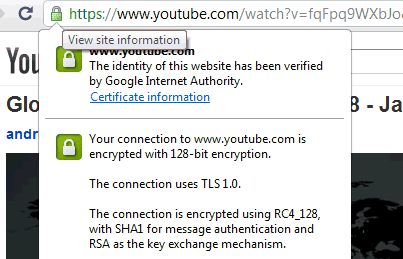
After Google enabled by default encrypted connections to Picasa Web Albums, it started to become obvious that all Google services will soon switch to HTTPS. Probably the most unlikely candidate for this change is YouTube, Google's biggest bandwidth hog, but the unexpected happened: go to a random video and you'll notice that all the resources use HTTPS.


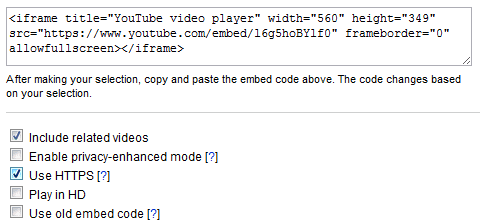
YouTube API's blog has recently announced HTTPS support for embedded videos. "We're planning a gradual expansion of HTTPS across other aspects of the site. The first place you may see HTTPS YouTube URLs is in our various embed codes, all of which currently support HTTPS in addition to the standard HTTP. Anyone can try HTTPS with YouTube embeds today—simply change the protocol portion of the URL from http to https." You can also enable "use HTTPS" when you generate the embedding code.


The performance doesn't seem to be affected and, if everything goes well, YouTube will probably switch to HTTPS in the coming months.

YouTube Comment Threading

Tuesday, January 25, 2011 0 comments
YouTube has a new option that lets you group comments and their replies. It's called "sort by thread" and it's only available if you click "see all" next to the number of comments. The option is useful if you read a reply to a comment, but you can't find the initial comment. Here's an example.

Sterling, a reader who noticed this feature, says that "the comments on YouTube are a mess, so confusing, but it looks like YouTube is testing threaded comments on the site. I wish this feature was in the watchpage, but it only shows up in the All comments page."


{ Thanks, Sterling. }