Showing posts with label Google Translate. Show all posts

Tabs in Google Translate

Friday, October 14, 2011 0 comments
Google Translate made it easier to translate a text into multiple languages by adding tabs. When you select a language from one of the two lists, it's added as a tab and you can quickly switch between the most recent three languages. Google's language detection works pretty well, so I'm not sure why there are tabs for the source languages, but the tabs for the target languages are useful.


You've probably noticed that Google Translate's custom drop-downs for selecting languages remember the most recent languages you've selected and highlight them.


In other Google Translate news, the Android app's conversation mode now supports 14 languages. "Earlier this year, we launched an update to Google Translate for Android with an experimental feature called Conversation Mode, which enables you to you translate speech back and forth between languages. We began with just English and Spanish, but today we're expanding to 14 languages, adding Brazilian Portuguese, Czech, Dutch, French, German, Italian, Japanese, Korean, Mandarin Chinese, Polish, Russian and Turkish," informs Google.

{ Thanks, Xavier. }

Rate Google Translations

Tuesday, August 2, 2011 0 comments
Google Translate has a new feature that allows users to improve translation quality: rating translations. There are three options: helpful, not helpful and offensive, but Google doesn't let you highlight the text that's poorly translated.


Another way to improve Google Translate is to click a word from the translated text and choose one of the alternate translations. You can also enter a better translation or hold down the shift key and drag the words to reorder them.

While Google Translate supports 64 languages, you probably use it for a small number of language pairs. That's the reason why Google highlights the languages you've recently selected.


{ Thanks, Charlie. }

A New Look for Google Translate

Tuesday, July 19, 2011 0 comments
Google Translate is the latest Google service with a new design based on Google+. Since Google Translate's interface is simple, there aren't many changes: a new grey header, updated buttons and drop-downs.


"We're working on a project to bring you a new and improved Google experience, and over the next few months, you'll continue to see more updates to our look and feel. The way people use and experience the web is evolving, and our goal is to give you a more seamless and consistent online experience—one that works no matter which Google product you're using or what device you're using it on," explained Google last month.

After launching a new interface for Google Search, Google created two themes that preview Gmail's new design and started to test Google Calendar's new UI and Blogger's new UI. Up next: Google Docs, Google Sites, Picasa Web Albums, Google Reader and probably other services.

{ Thanks, Kon. }

Google Translate Supports 5 Indic Languages

Wednesday, June 22, 2011 0 comments
Google Translate has improved a lot in the past 3 years and it's now the most powerful machine translation service that's available for free. Google Translate is the only machine translation service which supports languages that have less than one million speakers (Maltese, Welsh) and languages that are underrepresented on the Web (Galician).

Google added 5 new languages to Google Translate and they're some of the most popular languages in the world, with more than 600 million speakers: Bengali (300 million speakers), Gujarati (46 million), Kannada (51 million), Tamil (65 million), Telugu (130 million).

"Beginning today, you can explore the linguistic diversity of the Indian sub-continent with Google Translate, which now supports five new experimental alpha languages. (...) You can expect translations for these new alpha languages to be less fluent and include many more untranslated words than some of our more mature languages—like Spanish or Chinese — which have much more of the web content that powers our statistical machine translation approach. (...) Since these languages each have their own unique scripts, we've enabled a transliterated input method for those of you without Indian language keyboards," informs Google.


Google Translate now supports 63 languages and 9 of the 10 languages that have more than 100 million native speakers. The only missing language is Punjabi.

Google Translate, Now With Voice Input

Thursday, April 14, 2011 0 comments
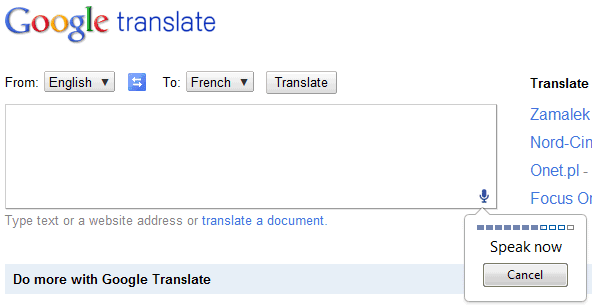
Google Chrome 11 added support for HTML speech input API. "With this API, developers can give web apps the ability to transcribe your voice to text. When a web page uses this feature, you simply click on an icon and then speak into your computer's microphone. The recorded audio is sent to speech servers for transcription, after which the text is typed out for you."

Google Translate is the first Google service that uses this feature. If you use Google Chrome 11 Beta, Google Chrome 12 Dev/Canary or a recent Chromium build and visit Google Translate, you can click the voice input icon. Right now, this feature only works for English, so you need to select "English" from the list of input languages.


Unfortunately, the results aren't great. I tried to translate "beautiful sunshine" into French, but the speech-to-text engine didn't work properly and Google had to translate "wake up beautiful sunshine girl".


{ Thanks, Kalin. }

Google Translate App for iPhone

Wednesday, February 9, 2011 0 comments
Yet another Google app initially developed for Android makes its way onto the Apple App Store: Google Translate. It doesn't have all the features of the Android app: there's no conversation mode, no SMS translation, Google Suggest or a list of related phrases. Another issue is that the font size is way too big.

The application has a feature that's not available in the Android app: full-screen mode, so it doesn't make sense to use a such a big font size which is not even configurable. Google says that "the ability to easily enlarge the translated text to full-screen size" makes it "much easier to read the text on the screen, or show the translation to the person you are communicating with. Just tap on the zoom icon to quickly zoom in."


Why would you use the native application instead of visiting translate.google.com? The native application supports voice input for 15 languages, text-to-speech for 23 languages and it's better suited for quickly switching between multiple languages.

{ via Google Mobile Blog }

Conversation Mode in Google Translate for Android

Wednesday, January 12, 2011 0 comments
Google Translate's app for Android added a feature that has previously announced by Google: conversation mode. The new option is experimental and it only works for English and Spanish, so it's more like an early preview. Conversation mode is a fancy name for making it easy to have a conversation in two different languages.

"In conversation mode, simply press the microphone for your language and start speaking. Google Translate will translate your speech and read the translation out loud. Your conversation partner can then respond in their language, and you'll hear the translation spoken back to you. Because this technology is still in alpha, factors like regional accents, background noise or rapid speech may make it difficult to understand what you're saying," explains Google.


The conversation is supposed to be fluid, but you still need to confirm that Google's voice recognition system worked well and tap the "Reply" button to switch roles. Here's a demo that shows the new feature in action for English and German:

Google Translate's Beatbox Easter Egg

Friday, December 17, 2010 0 comments
Last month, a Reddit user found an unexpected way to use Google Translate: as a beatbox.
1) Go to Google Translate
2) Set the translator to translate German to German
3) Copy + paste the following into the translate box: pv zk pv pv zk pv zk kz zk pv pv pv zk pv zk zk pzk pzk pvzkpkzvpvzk kkkkkk bsch
4) Click "listen"
5) Be amazed :)

You could also use this permalink, but it's less exciting. There are many other variations you could try.

Google decided to make it more obvious that this is an Easter egg by replacing "Listen" with "Beatbox".


Here's a YouTube video featured in Google Demo Slam:


{ Thanks, Zachary. }

Google Translate Shows Alternate Translations

0 comments
No translation is perfect, and that's especially true for a machine translation service like Google Translate. From now on, when you translate a text using Google Translate and Google finds some reliable alternate translations, you can pick one of them.

"Just click the translated phrase and you'll see a pop-up menu of possible alternates for that phrase, as well as the original phrase highlighted in your original text. Not only can these alternative translations give you a better understanding of a confusing translation, but they also allow you to help Google choose the best alternative when we make a mistake," explains Google.

It's interesting to notice that the new feature helps you better understand the technology behind Google Translate. "Typically, when we produce a translation, our system searches through millions of possible translations, selecting the best -- that is, the most statistically likely -- translation. With this feature, we expose more of those possible alternatives."


Right now, Google only shows alternate translations when you try to translate a text, so this doesn't work for web pages.