While watching this ad for Galaxy Nexus...
"Calling all pretty faces, all visionaries, all the pass-it-alongers, all meeters and greeters, all wandering navigators, and mad scientists. All high-defers, all late-night poets and daylight dreamers. The possibilities are calling."
... I realized that there's a famous ad which uses a similar enumeration. It's Apple's "Crazy Ones" commercial from 1997. Here's the unaired version narrated by Steve Jobs (you can also watch the version that aired on TV):
"Here's to the crazy ones. The misfits. The rebels. The troublemakers. The round pegs in the square holes. The ones who see things differently. They're not fond of rules. And they have no respect for the status quo. You can quote them, disagree with them, glorify or vilify them. About the only thing you can't do is ignore them. Because they change things. They push the human race forward. While some may see them as the crazy ones, we see genius. Because the people who are crazy enough to think they can change the world, are the ones who do."
Showing posts with label Mobile. Show all posts
Showing posts with label Mobile. Show all posts
A Great Ad for Galaxy Nexus
0 comments
Sometimes you need a great ad to show that your product stands out. Now that Galaxy Nexus is finally available in the US, Google uploaded some promotional videos. One of them is good enough to be a TV ad:
"With Hangouts, the unplanned meet-up comes to the web — and the phone. Let buddies know you're hanging out and see who drops by. Chat face to face with a group of up to ten people using your 1.3-MP front-facing camera, all on the go," explains Google.
"With Hangouts, the unplanned meet-up comes to the web — and the phone. Let buddies know you're hanging out and see who drops by. Chat face to face with a group of up to ten people using your 1.3-MP front-facing camera, all on the go," explains Google.

Gmail Scribbles
Wednesday, December 14, 2011 0 comments
Gmail's app for iOS and mobile Gmail added a cool feature that's not even available in the desktop interface: Gmail Scribbles. "You can now open up a canvas and scribble a message that will be attached to your email. It's perfect for sending a quick sketch that is hard to express in words or adding a fun graphic to make your email more personal. Scribbles support different colors, brush sizes, lines, erasers and spray paint." Maybe Scribbles is just a sneak peek at an upcoming mobile version of Google Drawings.

Gmail 1.1 for iOS also changed the notification sound, added better support for nested labels and Google+ Circles. The settings page that was available in the mobile web app, is now included in the iOS app, so you can add a custom signature and a vacation responder.
Gmail 1.1 for iOS also changed the notification sound, added better support for nested labels and Google+ Circles. The settings page that was available in the mobile web app, is now included in the iOS app, so you can add a custom signature and a vacation responder.
Google Mobile Search Increases Text Size
Saturday, December 10, 2011 0 comments
Google Mobile Search increased the text size for search results and reduced the number of words from the snippets. While this change made search results more legible, it also reduced the number of results that are displayed before you start scrolling.
On an iPhone, Google only displays two results in their entirety, instead of three results, and the snippets are way too short.
Old UI:

New UI:

On an iPhone, Google only displays two results in their entirety, instead of three results, and the snippets are way too short.
Old UI:
New UI:
Google Currents
Friday, December 9, 2011 0 comments
Flipboard is probably the most elegant app for reading news on an iPad (and now on the iPhone). Apple called it the iPad app of the year in 2010 and its success made other companies release magazine-like apps for reading news: Yahoo Livestand and now Google Currents.
Google's offering allows publishers to create mini-apps inside Google Currents. They can combine multiple feeds, photo streams and video streams, Google+ updates, create custom sections, add an icon and a splash page, customize the template and more. There are already 180 "editions" from sites like AllThingsD, Fast Company and more, but any site can be converted to an "edition" if it has a feed.
Currents is available in the US for iPhone, iPad and Android devices. You can only use it after signing in to your Google account, which has the benefit that all the settings are synced and you can read the same editions on different devices. You can add one of the built-in editions, import some of your Google Reader subscriptions or use the search feature to find blogs and news sites. Google also shows some popular stories from Google Trends.


"Great content needs a great audience, which is why Google Currents is integrated with Google+ so users can share articles or videos they've enjoyed with their circles. Publishers can also associate their account with Google Analytics in order to increase their awareness of consumers' content preferences, device use and geographic distribution," informs Google.


Google Currents automatically paginates articles, creates table of contents and emphasizes photos. The articles are synchronized, so you can read them even offline. This is especially useful if you have an Android device because the articles can be synchronized in the background.
Currents is a good alternative to apps like Flipboard and Pulse, but it doesn't integrate with Facebook and Twitter, the interface is not that smooth and it uses too many resources.

Update: Here's the Currents edition for this blog. You need to first install the Google Currents app on an iPhone, iPad or Android device and then click the link on your mobile device's browser.
Google's offering allows publishers to create mini-apps inside Google Currents. They can combine multiple feeds, photo streams and video streams, Google+ updates, create custom sections, add an icon and a splash page, customize the template and more. There are already 180 "editions" from sites like AllThingsD, Fast Company and more, but any site can be converted to an "edition" if it has a feed.
Currents is available in the US for iPhone, iPad and Android devices. You can only use it after signing in to your Google account, which has the benefit that all the settings are synced and you can read the same editions on different devices. You can add one of the built-in editions, import some of your Google Reader subscriptions or use the search feature to find blogs and news sites. Google also shows some popular stories from Google Trends.
"Great content needs a great audience, which is why Google Currents is integrated with Google+ so users can share articles or videos they've enjoyed with their circles. Publishers can also associate their account with Google Analytics in order to increase their awareness of consumers' content preferences, device use and geographic distribution," informs Google.
Google Currents automatically paginates articles, creates table of contents and emphasizes photos. The articles are synchronized, so you can read them even offline. This is especially useful if you have an Android device because the articles can be synchronized in the background.
Currents is a good alternative to apps like Flipboard and Pulse, but it doesn't integrate with Facebook and Twitter, the interface is not that smooth and it uses too many resources.
Update: Here's the Currents edition for this blog. You need to first install the Google Currents app on an iPhone, iPad or Android device and then click the link on your mobile device's browser.
Continuous Mode in Google Goggles
Wednesday, December 7, 2011 0 comments
Google Goggles for Android has a new mode that lets you find information about objects without manually taking pictures. Just enable the continuous mode and Goggles will automatically analyze the scene, upload the photos to Google's servers and show the results at the bottom of the screen. "Continuous mode is a quick and easy new way to use Goggles. You can now get results instantly without having to take a picture - no shutter press required! Goggles will scan the scene continuously so you don't need to worry about taking multiple pictures. The new continuous mode works best with books, products, artwork, and landmarks," explains Google. For now, Goggles can't detect text in the continuous mode, so you need to switch to the snapshot mode to translate a text, find an address or call a phone number.

The "live" mode is useful if you want to scan many barcodes or if you want to find information about many objects without spending a lot of time taking the perfect photos. Goggles is still far from perfect, so it will sometimes detect a lot of incorrect objects. You'll need a fast Internet connection, good lighting and an Android phone with a decent camera. Unfortunately, the application doesn't save its findings. While it's obvious that cluttering the history is not a good idea, saving the list of detected objects to a temporary page would be really useful.
Google Goggles 1.7 also adds a feature that returns pages which include the text you've scanned, even if it's a long text. This is especially useful for news articles. Now you can quickly find the online version of the content you're reading.

You can improve Goggles by adding information about the objects you know. Tap "can you suggest a better result?", draw a box around the object and describe the object. "To date, hundreds of thousands of submissions have been made to improve Goggles. Starting today, if you choose to suggest a better result or submit a new object altogether, your suggestion could become a result for the next user who searches for a similar object with Goggles," informs Google.
If you have a device that runs Android Gingerbread, Honeycomb or Ice Cream Sandwich, install Goggles from the Android Market or update to the latest version. According to Google, about 50.6% of the Android devices run Gingerbread and 2.4% of the devices run Android Honeycomb.
The "live" mode is useful if you want to scan many barcodes or if you want to find information about many objects without spending a lot of time taking the perfect photos. Goggles is still far from perfect, so it will sometimes detect a lot of incorrect objects. You'll need a fast Internet connection, good lighting and an Android phone with a decent camera. Unfortunately, the application doesn't save its findings. While it's obvious that cluttering the history is not a good idea, saving the list of detected objects to a temporary page would be really useful.
Google Goggles 1.7 also adds a feature that returns pages which include the text you've scanned, even if it's a long text. This is especially useful for news articles. Now you can quickly find the online version of the content you're reading.
You can improve Goggles by adding information about the objects you know. Tap "can you suggest a better result?", draw a box around the object and describe the object. "To date, hundreds of thousands of submissions have been made to improve Goggles. Starting today, if you choose to suggest a better result or submit a new object altogether, your suggestion could become a result for the next user who searches for a similar object with Goggles," informs Google.
If you have a device that runs Android Gingerbread, Honeycomb or Ice Cream Sandwich, install Goggles from the Android Market or update to the latest version. According to Google, about 50.6% of the Android devices run Gingerbread and 2.4% of the devices run Android Honeycomb.
Google Image Search Tests a New Tablet Interface
Tuesday, December 6, 2011 0 comments
Google tests a new tablet interface for the image search engine. The new UI uses a carousel that lets you browse through the image results, just like the search app for iPad. Google no longer loads the corresponding websites and only focuses on the images.


A similar slideshow is available in the smartphone interface and it will be interesting to see if it will be added to the desktop interface.
A similar slideshow is available in the smartphone interface and it will be interesting to see if it will be added to the desktop interface.
10 Billion Downloads in the Android Market
0 comments
Google announced that the Android Market "exceeded 10 billion app downloads". The number is impressive, considering that the number of downloads was 1 billion in July 2010, but it's still lower than the number of downloads from Apple's App Store. In January, Apple announced that over 10 billion apps have been downloaded from the App Store. In July, the number grew to 15 billion downloads and it's likely that Apple will soon announce 20 billion downloads.
Google will celebrate the milestone by offering many popular apps for only 10 cents. "Starting today for the next 10 days, we'll have a new set of awesome apps available each day for only 10 cents each. Today, we are starting with Asphalt 6 HD ($6.99), Color & Draw for Kids ($0.99), Endomondo Sports Tracker Pro ($3.99), Fieldrunners HD ($2.99), Great Little War Game ($2.99), Minecraft ($6.99), Paper Camera ($1.99), Sketchbook Mobile ($1.99), Soundhound Infinity ($4.99), Swiftkey X ($3.99)," informs Google. Probably the most useful app is Swiftkey X, a really smart virtual keyboard, but you can download all the apps for only one dollar.

Google will celebrate the milestone by offering many popular apps for only 10 cents. "Starting today for the next 10 days, we'll have a new set of awesome apps available each day for only 10 cents each. Today, we are starting with Asphalt 6 HD (
Cached Pages in Google Mobile Search
Monday, November 28, 2011 0 comments
Maybe it's not so obvious, but the link to the cached version of a search result is still available when you're using Google Search on a mobile phone. Just like in the desktop interface, you need to click the Instant Preview icon (a magnifier) and you'll find the "cached" link.

For some reason, the links to the mobile formatted version and to the list of similar pages are no longer displayed. To go back to the old interface that displayed all these links next to the search results, bookmark http://www.google.com/m or replace "google.com/search" with "google.com/m/search" in the URL (just add the two characters in bold).

For some reason, the links to the mobile formatted version and to the list of similar pages are no longer displayed. To go back to the old interface that displayed all these links next to the search results, bookmark http://www.google.com/m or replace "google.com/search" with "google.com/m/search" in the URL (just add the two characters in bold).
Restrict Google Results to Mobile Apps
Tuesday, November 22, 2011 0 comments
Google's search engine for mobile apps is now available in the sidebar. Just click "More" in the left sidebar and select "applications" to restrict the results to Android and iOS applications. The results aren't only from Apple's App Store and Google's Android Market: you'll also find results from AppBrain, AndroidZoom, CNet and more. Unfortunately, you can't restrict the results to iOS apps or Android, find iPad apps or filter the apps by rating or price.
Here are the results for [games]. The search engine doesn't have a proper homepage, but you can bookmark this page.

The search engine for mobile apps was initially available in the mobile version of Google Search as an OneBox, and then as a search option. Earlier this year, Google added support for app-related rich snippets.
Here are the results for [games]. The search engine doesn't have a proper homepage, but you can bookmark this page.
The search engine for mobile apps was initially available in the mobile version of Google Search as an OneBox, and then as a search option. Earlier this year, Google added support for app-related rich snippets.
Gmail's Hybrid iOS App
Wednesday, November 16, 2011 0 comments
Two weeks after the embarrassing launch, Gmail's app for iPhone and iPad is back in the App Store. Google fixed a bug that broke one of the main features: notifications and that's the reason why the app has been temporarily removed from the App Store.
Gmail's "native" app is actually a wrapper for a new version of the Gmail web app, enhanced with a few features that integrate it with the operating system: basic push notifications, image upload and a new navigation menu. It's interesting that the new interface of the mobile web app is only available if you use the "native" app.
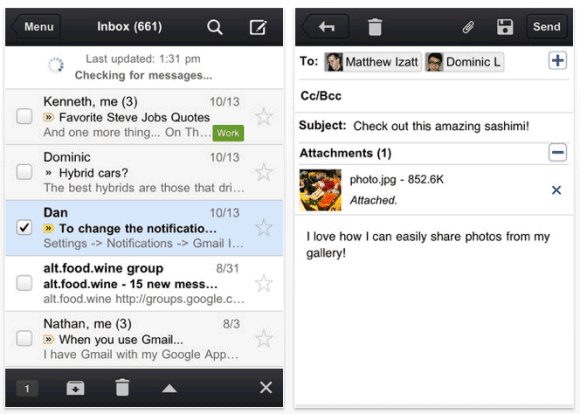
I've always thought that Gmail's mobile web app is much better than the native Android app, so it's a pleasant surprise to see that Google didn't develop a completely new app for iOS. This way, you'll always get the latest features and you don't have to wait until Google releases a new version.
Regarding notifications, the app only supports badges and sound notifications, so you won't see the banner notifications introduced in iOS 5. Hopefully, Google will address this issue in a future update.
"To try out the Gmail app today, install it from App Store on any iOS 4+ device. Those who already have the Gmail app released Nov 2 must uninstall or log out of the old app prior to installing the new app," suggests Google.
Gmail's "native" app is actually a wrapper for a new version of the Gmail web app, enhanced with a few features that integrate it with the operating system: basic push notifications, image upload and a new navigation menu. It's interesting that the new interface of the mobile web app is only available if you use the "native" app.
I've always thought that Gmail's mobile web app is much better than the native Android app, so it's a pleasant surprise to see that Google didn't develop a completely new app for iOS. This way, you'll always get the latest features and you don't have to wait until Google releases a new version.
Regarding notifications, the app only supports badges and sound notifications, so you won't see the banner notifications introduced in iOS 5. Hopefully, Google will address this issue in a future update.
"To try out the Gmail app today, install it from App Store on any iOS 4+ device. Those who already have the Gmail app released Nov 2 must uninstall or log out of the old app prior to installing the new app," suggests Google.
Flash and Mobile Devices
Monday, November 14, 2011 0 comments
Last week, Adobe announced that it will stop developing the Flash Player for mobile devices. It may seem like a surprising news, but the most convincing reason to create Flash apps and sites is Flash's installed base. Because of the popularity of YouTube and other sites that require Flash, most computer users install the Flash Player (99% of the Internet-enabled computers, according to Adobe).
That's not the case when it comes to mobile devices: Flash Player can only be installed in Android 2.2+, Blackberry PlayBook and HP webOS. According to Adobe, "by the end of 2010, over 35 models of smartphones were certified for Flash Player, and over 20 million smartphones either shipped with or downloaded Flash Player." The estimated percentage for Flash-enabled mobile devices shipped in 2011 is 36%. Since Apple's iOS devices and Windows Phone devices won't include support for Flash, it's obvious that Flash can't become ubiquitous on mobile devices. In fact, right now, it's mostly limited to Android and that's exactly what Adobe doesn't want to achieve.
Adobe's biggest mistake was that it assumed that Flash could be a great option for building mobile web apps. The mobile Flash Player was useful to load pages that required Flash, but that's because users didn't have other options. The experience wasn't great, scrolling was jerky, Flash objects looked disconnected from the rest of the page, so it was a good idea to only load Flash content on-demand.
Developers that want to build mobile apps right now have two options: either build HTML5 apps that work in any modern browser or create native apps for iOS, Android and other platforms. Adobe has tools for both options and the goal for the future is to improve them. "HTML5 is now universally supported on major mobile devices, in some cases exclusively. This makes HTML5 the best solution for creating and deploying content in the browser across mobile platforms," says Adobe. "Our future work with Flash on mobile devices will be focused on enabling Flash developers to package native apps with Adobe AIR for all the major app stores." Both AIR apps and HTML5 apps are already successful and the main advantage is that they don't require a plugin.
While it's nice to be able to load sites that require Flash on your phone and tablet, Flash is not a technology for the future, it's mostly for the past. Steve Jobs was right to say that "open standards created in the mobile era, such as HTML5, will win on mobile devices (and PCs too)" and to recommend Adobe to "focus more on creating great HTML5 tools for the future, and less on criticizing Apple for leaving the past behind".
Google chose pragmatism and started to collaborate with Adobe, who developed Flash for Android, Google TV and a more secure Flash plugin bundled with Chrome. Android's open nature and Chrome's focus on security made this possible. The end result was that users had the option to install Flash on their mobile devices and their desktop browser was more secure, since Flash was sandboxed and automatically updated.
Both Apple and Google cared about users, but in different ways: Apple wanted to provide a better experience, while Google wanted to provide more options. Flash was the wrong option for mobile devices, but it was the only option to load some sites.
That's not the case when it comes to mobile devices: Flash Player can only be installed in Android 2.2+, Blackberry PlayBook and HP webOS. According to Adobe, "by the end of 2010, over 35 models of smartphones were certified for Flash Player, and over 20 million smartphones either shipped with or downloaded Flash Player." The estimated percentage for Flash-enabled mobile devices shipped in 2011 is 36%. Since Apple's iOS devices and Windows Phone devices won't include support for Flash, it's obvious that Flash can't become ubiquitous on mobile devices. In fact, right now, it's mostly limited to Android and that's exactly what Adobe doesn't want to achieve.
Adobe's biggest mistake was that it assumed that Flash could be a great option for building mobile web apps. The mobile Flash Player was useful to load pages that required Flash, but that's because users didn't have other options. The experience wasn't great, scrolling was jerky, Flash objects looked disconnected from the rest of the page, so it was a good idea to only load Flash content on-demand.
Developers that want to build mobile apps right now have two options: either build HTML5 apps that work in any modern browser or create native apps for iOS, Android and other platforms. Adobe has tools for both options and the goal for the future is to improve them. "HTML5 is now universally supported on major mobile devices, in some cases exclusively. This makes HTML5 the best solution for creating and deploying content in the browser across mobile platforms," says Adobe. "Our future work with Flash on mobile devices will be focused on enabling Flash developers to package native apps with Adobe AIR for all the major app stores." Both AIR apps and HTML5 apps are already successful and the main advantage is that they don't require a plugin.
While it's nice to be able to load sites that require Flash on your phone and tablet, Flash is not a technology for the future, it's mostly for the past. Steve Jobs was right to say that "open standards created in the mobile era, such as HTML5, will win on mobile devices (and PCs too)" and to recommend Adobe to "focus more on creating great HTML5 tools for the future, and less on criticizing Apple for leaving the past behind".
Google chose pragmatism and started to collaborate with Adobe, who developed Flash for Android, Google TV and a more secure Flash plugin bundled with Chrome. Android's open nature and Chrome's focus on security made this possible. The end result was that users had the option to install Flash on their mobile devices and their desktop browser was more secure, since Flash was sandboxed and automatically updated.
Both Apple and Google cared about users, but in different ways: Apple wanted to provide a better experience, while Google wanted to provide more options. Flash was the wrong option for mobile devices, but it was the only option to load some sites.
Google Tests a New Search Interface for Tablets
Wednesday, October 26, 2011 0 comments
Google experiments with a slightly different search interface for tablets. There's a new settings button below the search box that lets you disable SafeSearch and use the advanced search filters. The most popular specialized search engines are no longer hidden behind a small arrow: the new interface mimics the desktop UI and displays a list of search engines, followed by a "more" link. It's quite obvious that the navigation bar starts to become unnecessary, now that the settings button and most navigation links are displayed below the search box.


Three months ago, Google launched an interface optimized for iPad and Android tablets.
Three months ago, Google launched an interface optimized for iPad and Android tablets.
Google Goggles Makes Your Phone's Camera Smarter
Wednesday, September 14, 2011 0 comments
Google Goggles is an application that's sometimes useful, but it's not good enough to use it every time you want to find something about an object. The Android app has a new feature that integrates it with the Camera app, uploads all the photos you're taking to Google's servers and shows notifications in the status bar if Goggles found something useful. It may sound spooky, but it makes your phone's camera smarter.
"With this new opt-in feature in Goggles, you can simply photograph an image using your phone's camera, and Goggles will work in the background to analyze your image. If your photo contains items that Goggles can recognize, the app will notify you," explains Google. The feature is disabled by default, but you can enable it from the settings page by choosing "Search from Camera".
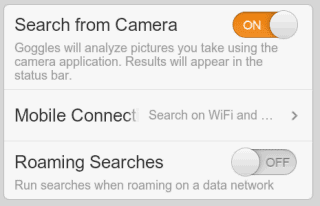
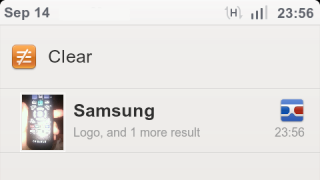
It's probably a good idea to only enable this option when you're on vacation or when you're planning to photograph barcodes for products you want to buy. It's also useful if you're in a bookstore and you want to "bookmark" some books.
Google Mobile's help center informs that "each Goggles query consumes approximately 100 KB of data" and you can limit the amount of data that's consumed by selecting "Search on WiFi networks only" under "Mobile Connection".
"Search from Camera" is one of the features that won't be available in the Google app for iPhone because iOS' background APIs aren't that powerful. If you have an Android device, install Google Goggles 1.6 from the Android Market.
"With this new opt-in feature in Goggles, you can simply photograph an image using your phone's camera, and Goggles will work in the background to analyze your image. If your photo contains items that Goggles can recognize, the app will notify you," explains Google. The feature is disabled by default, but you can enable it from the settings page by choosing "Search from Camera".
It's probably a good idea to only enable this option when you're on vacation or when you're planning to photograph barcodes for products you want to buy. It's also useful if you're in a bookstore and you want to "bookmark" some books.
Google Mobile's help center informs that "each Goggles query consumes approximately 100 KB of data" and you can limit the amount of data that's consumed by selecting "Search on WiFi networks only" under "Mobile Connection".
"Search from Camera" is one of the features that won't be available in the Google app for iPhone because iOS' background APIs aren't that powerful. If you have an Android device, install Google Goggles 1.6 from the Android Market.
iPhone App for Blogger
Thursday, September 8, 2011 0 comments
Blogger has an app for iPhone and it's better than the corresponding Android app, which has improved a lot in the past months. Both apps let you edit your existing posts and create new posts, add images to your posts, include labels and geolocate your posts.
They're pretty basic, but the iPhone app has a better interface, it's easier to use and pays attention to detail. For example, the iPhone app includes the URL of the blog next to the name when you switch to a different blog, so that it's easier to identify a blog. The Android app only shows the names. To publish a post in the iPhone app, you need to tap the "Publish" button, which is always displayed at the top of the screen. In the Android app you need to scroll to the bottom of the post to find the "publish" button.
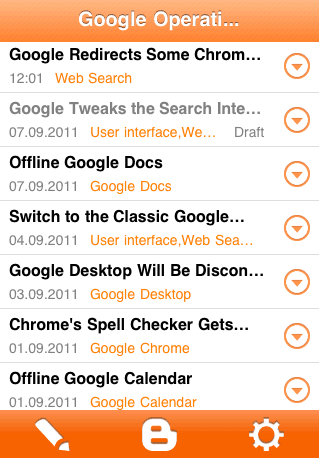
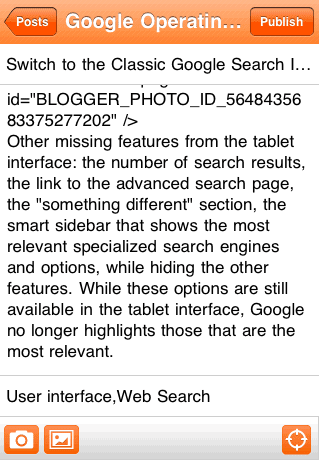
"With the Blogger app, you can write a new blog post and publish it immediately or save it as a draft right from your iOS device. You can also open a blog post you've been working on from your computer and continue editing it while you're on-the-go. Your blog posts are automatically synced across devices, so you’ll always have access to the latest version," informs Google.
They're pretty basic, but the iPhone app has a better interface, it's easier to use and pays attention to detail. For example, the iPhone app includes the URL of the blog next to the name when you switch to a different blog, so that it's easier to identify a blog. The Android app only shows the names. To publish a post in the iPhone app, you need to tap the "Publish" button, which is always displayed at the top of the screen. In the Android app you need to scroll to the bottom of the post to find the "publish" button.
"With the Blogger app, you can write a new blog post and publish it immediately or save it as a draft right from your iOS device. You can also open a blog post you've been working on from your computer and continue editing it while you're on-the-go. Your blog posts are automatically synced across devices, so you’ll always have access to the latest version," informs Google.
Google Makes Money from Chromebooks
Friday, July 22, 2011 0 comments
While many people think there's a lot of overlap between Android and Chrome OS, the products don't have a lot in common. Chrome OS is a proprietary operating system based on an open-source project and OEMs can't tweak it or add new features. Just like for Nexus One and Nexus S, you get all of the updates from Google. Another difference is that Chrome OS is constantly updated and you can even switch to the beta or the dev channel to try the latest features. Chrome OS has an automatic update feature, so that Chromebooks run the latest version of the operating system.
Google's CFO, Patrick Pichette, mentioned another difference between Android and Chrome OS: "Google is making some money from companies buying computers that run the Chrome operating system." Google came up with an innovative subscription model for businesses and schools. Instead of paying for the hardware, organizations can pay $20-$33/device/month and get a notebook, enterprise support, new devices every 3 years or even more often, a Web-based central management console, integration with Google Apps. While enterprise Chromebooks are a lot more expensive than the regular Chromebooks available at Amazon or Best Buy, Google says that the total cost of ownership of a notebook can be reduced by up to 70%. "Chromebooks and the management console automate or eliminate many common, time-intensive IT tasks like machine image creation, application distribution, patching, and upgrades. Additionally, there is no need to purchase licenses for anti-virus, data encryption or data back-up software."
Like Android, Chrome OS also encourages people to use Google's services more often. "People search more when they use the Chrome browser or Android phones, which increases Google's core business," says Patrick Pichette. Android will also offer additional revenue opportunities. "Nonsearch revenue will eventually arrive for Android as it combines Google Maps, mobile payments with Google Wallet and daily deals with Google Offers."
For now, Chromebooks are the perfect Google Apps "thin clients", while Android devices have so many sensors that help you explore the world and make Web services a lot more useful when you are on the go.
Google's CFO, Patrick Pichette, mentioned another difference between Android and Chrome OS: "Google is making some money from companies buying computers that run the Chrome operating system." Google came up with an innovative subscription model for businesses and schools. Instead of paying for the hardware, organizations can pay $20-$33/device/month and get a notebook, enterprise support, new devices every 3 years or even more often, a Web-based central management console, integration with Google Apps. While enterprise Chromebooks are a lot more expensive than the regular Chromebooks available at Amazon or Best Buy, Google says that the total cost of ownership of a notebook can be reduced by up to 70%. "Chromebooks and the management console automate or eliminate many common, time-intensive IT tasks like machine image creation, application distribution, patching, and upgrades. Additionally, there is no need to purchase licenses for anti-virus, data encryption or data back-up software."
Like Android, Chrome OS also encourages people to use Google's services more often. "People search more when they use the Chrome browser or Android phones, which increases Google's core business," says Patrick Pichette. Android will also offer additional revenue opportunities. "Nonsearch revenue will eventually arrive for Android as it combines Google Maps, mobile payments with Google Wallet and daily deals with Google Offers."
When we have products that get resounding user and consumer success and that are growing in the hundreds of millions we don't worry. The only question is when and how will we monetize. Everybody's all nervous about the fact it's been 36 months since Android has launched and you only have search (revenue). That's the criticism I hear. The questions that are asked are so short-termish. That's just not the way that Google thinks.
For now, Chromebooks are the perfect Google Apps "thin clients", while Android devices have so many sensors that help you explore the world and make Web services a lot more useful when you are on the go.
Google+ App for iPhone
Wednesday, July 20, 2011 0 comments
Google's iPhone app for Google+ has been finally approved by Apple and it's the top free app in the US App Store. For some reason, the app is not compatible with iPod Touches and iPads, so it only works if you have an iPhone.
Google+ for iPhone has most of the features of the Android app, but it doesn't support instant uploads and lacks the advanced settings from the Android app.

The app has been criticized for the non-standard interface. "Google+ app uses left-right swiping to change views in your 'Stream'. I see three: Incoming, Circles, and Nearby. The idiomatic iOS design for this would be a tab controller at the bottom with three tabs, one for each view," says John Gruber.

Other users complain that they need an invitation to use Google+ and a surprising number of people say that the app doesn't work well in iOS 5, which is still in beta and can only be installed by developers, at least officially. This shows that many of the 18 million Google+ users are developers and tech enthusiasts.
Google+ for iPhone has most of the features of the Android app, but it doesn't support instant uploads and lacks the advanced settings from the Android app.
The app has been criticized for the non-standard interface. "Google+ app uses left-right swiping to change views in your 'Stream'. I see three: Incoming, Circles, and Nearby. The idiomatic iOS design for this would be a tab controller at the bottom with three tabs, one for each view," says John Gruber.
Other users complain that they need an invitation to use Google+ and a surprising number of people say that the app doesn't work well in iOS 5, which is still in beta and can only be installed by developers, at least officially. This shows that many of the 18 million Google+ users are developers and tech enthusiasts.
Mobile Gmail Adds "Pull Down to Refresh"
Wednesday, June 22, 2011 0 comments
Gmail's mobile Web app for iOS added a feature first available in Tweetie, which is now the official Twitter client for iPhone and iPad. Instead of clicking a button to refresh the list of messages, you simply pull down the list and wait to see the new messages. It's a really intuitive way to update a list and many mobile apps started to use it.

"One thing that's cool about Tweetie 2 is the fresh paradigm to refreshing the contents of a table view. Up until now we had been looking for space to mount a reload button on, sometimes having to resort to adding an extra tool bar for just one view so that you can have enough space. Now if you have a tableview that it sorted reverse chronologically, then you have a natural urge to make new items appear at the top by pulling down the table with extra force," suggested Oliver Drobnik back in 2009, when Tweetie added this feature, which is now available in mobile Gmail.
"One thing that's cool about Tweetie 2 is the fresh paradigm to refreshing the contents of a table view. Up until now we had been looking for space to mount a reload button on, sometimes having to resort to adding an extra tool bar for just one view so that you can have enough space. Now if you have a tableview that it sorted reverse chronologically, then you have a natural urge to make new items appear at the top by pulling down the table with extra force," suggested Oliver Drobnik back in 2009, when Tweetie added this feature, which is now available in mobile Gmail.
Google Tests a New Mobile Navigation Bar
Tuesday, May 31, 2011 0 comments
Some Google users spotted an experimental interface for Google's mobile search site. The horizontal navigation bar now includes icons, just like the vertical desktop bar. While the new interface is less streamlined, it looks more like a Web app and it makes it easier to select a different search service or a Google app.


{ Thanks, Andrew and David. }
{ Thanks, Andrew and David. }
More Features in Google Maps for Mobile Browsers
Saturday, May 21, 2011 0 comments
One of the most underrated Google mobile Web apps is Google Maps. Most smartphones and tablets have a native app for Google Maps, so a mobile Web app doesn't seem necessary. Unfortunately, native apps aren't always updated frequently and there are many missing features. Google does a good job at updating Google Maps for Android, but Apple's Maps app for iOS rarely includes new Google Maps features.
That's probably one of the reasons why the Google Maps mobile site was updated to include most of the features from the desktop site. Another reason is that Google wants to offer "a consistent Google Maps experience wherever you use it."
The updated Google Maps mobile site has features like local business search, Google Places, driving directions, layers, My Maps, starred locations, search suggestions. If you can't find biking directions or information about businesses in the Maps app for the iPhone, you can go to maps.google.com in your mobile browser and use these features.

Just like the mobile YouTube site, "Google Maps for mobile browsers is platform independent - you will always get a consistent experience and the latest features without needing to install any updates, no matter what phone you use."
I've tried the updated mobile interface on an iPhone 3GS, a Nexus One and an iPad 2. While all the new features are great, the site is still too slow and unresponsive to be useful. Until Google solves performance issues and mobile browsers become more powerful, people will still use the native app.
That's probably one of the reasons why the Google Maps mobile site was updated to include most of the features from the desktop site. Another reason is that Google wants to offer "a consistent Google Maps experience wherever you use it."
The updated Google Maps mobile site has features like local business search, Google Places, driving directions, layers, My Maps, starred locations, search suggestions. If you can't find biking directions or information about businesses in the Maps app for the iPhone, you can go to maps.google.com in your mobile browser and use these features.
Just like the mobile YouTube site, "Google Maps for mobile browsers is platform independent - you will always get a consistent experience and the latest features without needing to install any updates, no matter what phone you use."
I've tried the updated mobile interface on an iPhone 3GS, a Nexus One and an iPad 2. While all the new features are great, the site is still too slow and unresponsive to be useful. Until Google solves performance issues and mobile browsers become more powerful, people will still use the native app.
Subscribe to:
Posts (Atom)


