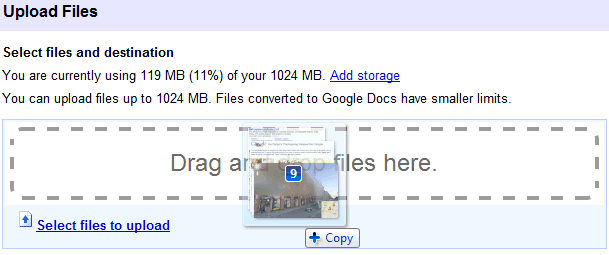
Google Docs added support for drag and drop uploads, a feature that's already available in Gmail. The main advantage is that the new feature doesn't use Flash or another plug-in, so it should be more reliable.
"If you're using Chrome, Safari, or Firefox, you'll be able to quickly drag files into the drop area and shoot them up to the cloud," informs the Google Docs blog.
In the near future, this option could be used to upload folders, not just multiple files. Google Chrome already supports directory upload using the input tag.
Google Docs also added a menu option that lets you hide the title bar: View > Compact Controls. It's only available in the new document editor and it's probably more useful than the "hide controls" feature from the previous version of the editor.
Here are some of the most annoying Google Search bugs I've found recently:
1. Google's keyboard shortcuts are useful if you want to select a search result, but Google doesn't remember the page you selected when you go back to the search results page.
2. To add insult to injury, Google doesn't scroll to the search result you've clicked on after visiting the page and returning to the Google SERP.
3. Let's say that a search result snippet includes a useful information and you want to copy it. If you double click on a word from the snippet, you'll trigger Google's instant previews.
4. If your query includes quotes, Google's suggestions aren't useful because they ignore your quotes.
5. Google shows too many results from a single domain. If your query includes keywords associated with a site, Google may show up to 7 results from a domain. Google also lets you see other results from the same domain, but there are many duplicates.
6. If you restrict the results to visited pages and perform the same search using Google Web History, you'll get different results.
7. Sometimes personalization goes too far and replaces the top search result for a navigational query.
Google's doodles were special because they linked to search results pages, instead of linking to handpicked pages. Some doodles promoted Google services, so they sent users to special landing pages, but all the other doodles linked to regular results pages. That's not the case for Google's Thanksgiving doodle, which promotes a Google page with Thanksgiving recipes from Ina Garten.
"This Thanksgiving holiday, we are grateful for many things: family, friends, and of course, food. Just in time for the big day, beloved cookbook author and TV chef Ina Garten offers everyone six simple yet delicious recipes to make one of the year's biggest dinner parties as easy as, well, pumpkin pie. Happy Thanksgiving, and Happy Cooking!"
Barry Schwartz notes that "it is uncommon for Google to offer pre-holiday logos" and that "the logo promotes a person without that person celebrating a birthday or anniversary".
Google has finally added street level imagery for some of the biggest cities from Germany: Berlin, Hamburg, Frankfurt, Munich and 16 other cities. Unfortunately, many of the images are blurred because of privacy concerns. According to Spiegel, the launch has been delayed for several years.
In contrast to other countries, the launch of Street View was met with considerable resistance from politicians and privacy protection advocates in Germany, including the country's consumer protection minister, Isle Aigner of the conservative Christian Social Union, who criticized the service as an incursion on people's privacy. (... )
As was widely expected, one doesn't have to look very far in Street View to find homes that have been blurred out. Prior to the introduction of the service, more than 244,000 households in the first 20 cities to be placed online submitted requests to have their homes blurred out. Google claims the figure represents only 3 percent of households. (...)
Nevertheless, there are considerable obstructed images in the German version of Street View. In any instance where an apartment renter asked to have their flat pixilated, Google blurred out the entire building they live in. Data protection authorities believe that up to a million households across the country have been blurred out by the company.
Google Chrome's comic book was a great way to introduce to the world a new browser, but not everyone knew what's an URL or a web app. "20 Things I Learned About Browsers and the Web" is a guidebook created by the Google Chrome team that tries to address this issue by explaining complicated terms like "Internet", "cloud computing", "JavaScript", "HTML5", "cookies", "URL", "IP address" using illustrations and real life analogies. Here's an example:
"An IP address is a series of numbers that tells us where a particular device is on the Internet network, be it the google.com server or your computer. It's a bit like mom's phone number: just as the phone number tells an operator which house to route a call to so it reaches your mom, an IP address tells your computer which other device on the Internet to communicate with — to send data to and get data from."
The guidebook is actually a great example of an HTML5 web application that works offline and Google recommends to read it in "Chrome or any up-to-date, HTML5-compliant modern browser". Most of the examples from the book are about Google Chrome and that's what makes it look like a Chrome ad.
Received this award from my fabby DT teamie Lisa . Appolopgy for the lateness on posting this kind gesture of yours and for thinking of me but as usual if I don't do something there and then I tend to forget and suddenly out of the blue it comes back to me. This ones a bit different as you get a voucher to spend at digis with attitude - click HERE to find out all about it ..I have to tell you 3
2010 is the year when Google made the most significant changes to the Google search interface. After many years of improving the underlying search technology without too many obvious changes, Google felt that it has to morph Google search into a modern web application.
Today, Google's search engine has a lot of features that clutter the interface and advanced search features that can't be disabled. The focus has shifted from simplicity to interactivity. Google tries to anticipate your query after typing a few characters, you can filter the results by clicking on an option from the sidebar and you can even preview the results using annotated screenshots.
Until a few years ago, Google tried to find the best search results for your query. Now it helps you find the best query for your search. Google shows search suggestions, automatically corrects typos, ignores words from your query and fetches the list of search results as you type a query. Google search is now a web app that empowers users to adjust the results and to make decisions. It's not a decision search engine, it's just a search engine that lets you decide what are the best results.
Google's results are already personalized using signals like location or search history, but that's no longer enough to sift through billions of search results. The search box can't always capture user intent, so Google had to find ways to extend the search box to the entire search results page.
"As people get more sophisticated at search they are coming to us to solve more complex problems. To stay on top of this, we have spent a lot of time looking at how we can better understand the wide range of information that's on the web and quickly connect people to just the nuggets they need at that moment," explained a Google blog post from 2009 that announced the search options sidebar.
Google is all about reducing the friction of entering a query. You no longer have to "feel lucky" when you type something in the search box because the results are displayed instantly and you can quickly adjust them. Google's results don't have to be perfect because you can customize them until they're perfect for you.
There's one Google doodle that captures the essence of Google's transformation from a simple search engine to an interactive web app. It was used to promote Google Instant, but it's probably the best summary of this post: