Morning folks. Sunday's turning out to be a quiet day here, grandkids have gone home early because poor Mum has succumbed to their sicky bug. Nothing like your own home when your feeling poorly. Hope Kelly's better soon.
Really enjoyed making these cards which I have posted seperately!. Less is more for me but do they fit the Less is More challenge! Not sure on that one but hopefully they do.
Blogger's Slideshow Feature
Saturday, September 17, 2011 0 comments
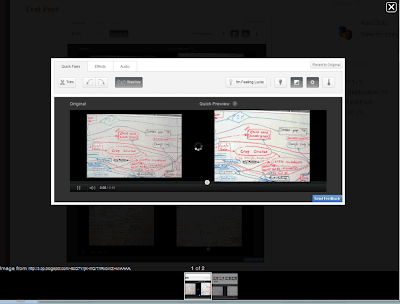
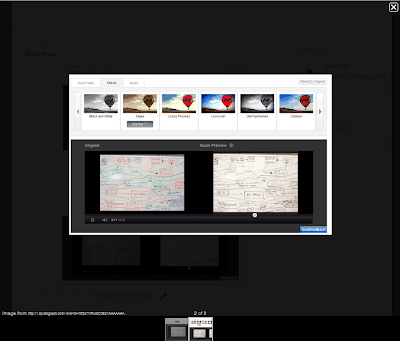
Blogger added a feature that makes it easier to view multiple photos. When you click on an image from a Blogger post, a LightBox-like overlay shows a bigger version of the image and lets you view the other images in a slideshow. The feature was borrowed from Google+, it's enabled by default and can't be disabled from the settings page.
If you want to open an image in a new tab, middle-click on the URL displayed below the image or right-click the link and select "open link in new tab". The slideshow supports keyboard shortcuts: left/right arrows, j/k, n/p to navigate, Esc to close the slideshow.
{ Thanks, Petros and Cougar. }
If you want to open an image in a new tab, middle-click on the URL displayed below the image or right-click the link and select "open link in new tab". The slideshow supports keyboard shortcuts: left/right arrows, j/k, n/p to navigate, Esc to close the slideshow.


{ Thanks, Petros and Cougar. }

Is there Anyone at Home!
Friday, September 16, 2011 0 commentsAfternoon folks, went off on a crafty shop yesterday afternoon with my crafty friend Lily to Insch to Lainesworld to see Elaine. Always makes you so welcome. A lovely time we had, some crafty stash, coffee, choccy biscuits and lots of laughs.
Okay!
A bit more than a less is more card with the added flowers but still a clean card from me! Was really just playing about with my Fiskars anywhere
Rich Snippets for Apps
Thursday, September 15, 2011 0 comments
Now that both the Apple App Store and the Android Market have Web interfaces, Google decided to show better snippets for the results from these sites. The next time you search for [Angry Birds], [Cut the Rope], [Shazam] or [ASTRO File Manager], you'll find results that include a small icon, the app's rating, the number of reviews and the price. For now, only the results from the Android Market include thumbnails.
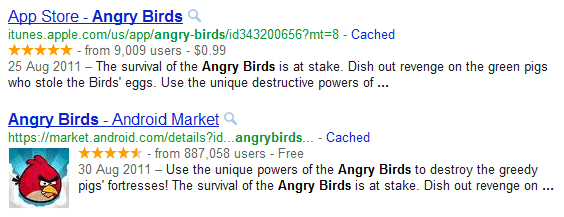
Google also shows rich snippets for review sites like CNET. If you own an app store or you have a site that allows users to download software, you can get similar snippets by adding some special markup. "When you mark up software application information in the body of a web page, Google can identify it and, when users search for apps, use this information to better display your app details in search results."
Google also shows rich snippets for review sites like CNET. If you own an app store or you have a site that allows users to download software, you can get similar snippets by adding some special markup. "When you mark up software application information in the body of a web page, Google can identify it and, when users search for apps, use this information to better display your app details in search results."
YouTube's New Video Editor
0 comments
YouTube has a new online video editor that lets you trim the video, rotate it, remove shaky camera motions, adjust the contrast, saturation and color temperature, apply simple effects like "sepia", "cartoon", "thermal" and add a free audio soundtrack from YouTube's library.
While the editor is pretty basic, the main advantage is that you can replace the original video, but this only works if your video has less than 1,000 views and YouTube hasn't received a copyright complaint from a third-party. There's also a "save as" option that lets you save the edited version as a new video.
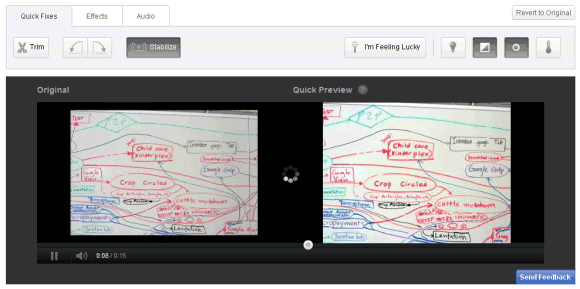
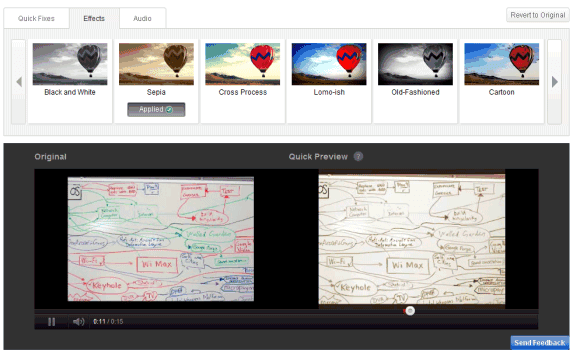
How to find the new editor? Make sure you're logged in, go to "My videos & playlists" and click "Edit video" next to the video you want to edit. You can also open a video you've uploaded and click "Edit video".
To make things more confusing, YouTube has another video editor that lets you mix your videos and Creative Commons videos from other YouTube users, add audio soundtracks from YouTube's library and apply transitions.
While the editor is pretty basic, the main advantage is that you can replace the original video, but this only works if your video has less than 1,000 views and YouTube hasn't received a copyright complaint from a third-party. There's also a "save as" option that lets you save the edited version as a new video.
How to find the new editor? Make sure you're logged in, go to "My videos & playlists" and click "Edit video" next to the video you want to edit. You can also open a video you've uploaded and click "Edit video".
To make things more confusing, YouTube has another video editor that lets you mix your videos and Creative Commons videos from other YouTube users, add audio soundtracks from YouTube's library and apply transitions.
Let's Pretend!
0 comments
Morning folks my it was windy here yesterday, washing was coming along nicely and then the rain joined in! Got soaked rescueing it, never mind least I didn't chance it and leave it out thinking it won't come to much.
A card for a 50th youthful looking lady who loves black and red . Used Craftwork papers , a Marianne Designs stamp, now which one! Have such a muddle on my desk I have no idea where
A card for a 50th youthful looking lady who loves black and red . Used Craftwork papers , a Marianne Designs stamp, now which one! Have such a muddle on my desk I have no idea where
Google Goggles Makes Your Phone's Camera Smarter
Wednesday, September 14, 2011 0 comments
Google Goggles is an application that's sometimes useful, but it's not good enough to use it every time you want to find something about an object. The Android app has a new feature that integrates it with the Camera app, uploads all the photos you're taking to Google's servers and shows notifications in the status bar if Goggles found something useful. It may sound spooky, but it makes your phone's camera smarter.
"With this new opt-in feature in Goggles, you can simply photograph an image using your phone's camera, and Goggles will work in the background to analyze your image. If your photo contains items that Goggles can recognize, the app will notify you," explains Google. The feature is disabled by default, but you can enable it from the settings page by choosing "Search from Camera".
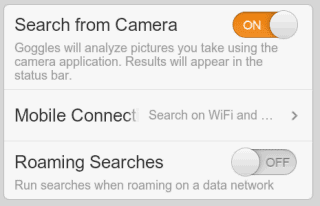
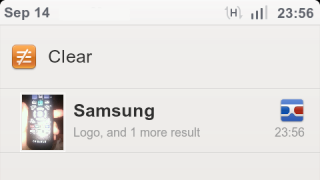
It's probably a good idea to only enable this option when you're on vacation or when you're planning to photograph barcodes for products you want to buy. It's also useful if you're in a bookstore and you want to "bookmark" some books.
Google Mobile's help center informs that "each Goggles query consumes approximately 100 KB of data" and you can limit the amount of data that's consumed by selecting "Search on WiFi networks only" under "Mobile Connection".
"Search from Camera" is one of the features that won't be available in the Google app for iPhone because iOS' background APIs aren't that powerful. If you have an Android device, install Google Goggles 1.6 from the Android Market.
"With this new opt-in feature in Goggles, you can simply photograph an image using your phone's camera, and Goggles will work in the background to analyze your image. If your photo contains items that Goggles can recognize, the app will notify you," explains Google. The feature is disabled by default, but you can enable it from the settings page by choosing "Search from Camera".
It's probably a good idea to only enable this option when you're on vacation or when you're planning to photograph barcodes for products you want to buy. It's also useful if you're in a bookstore and you want to "bookmark" some books.
Google Mobile's help center informs that "each Goggles query consumes approximately 100 KB of data" and you can limit the amount of data that's consumed by selecting "Search on WiFi networks only" under "Mobile Connection".
"Search from Camera" is one of the features that won't be available in the Google app for iPhone because iOS' background APIs aren't that powerful. If you have an Android device, install Google Goggles 1.6 from the Android Market.
Subscribe to:
Posts (Atom)


