Johnny: "Hey Dad"
Dad: "What John"
Johnny: "Is there a Daddy's room with Daddy toys at your work?"
-overheard at dinner on April 4, 2011
So funny to imagine what goes on in little chidren's heads. Johnny thinking Daddy was playing with toys all day long. James' WISHES he was playing with toys all day long. Wouldn't that be the life of a hardworking man!
Little late in posting. I had this written down on a sticky note to jot down in my journal/blog for the past 5 months. Johnny you can thank me later :)
Fusion Tables, a New Google Docs App
Posted by R3ank at 7:03 AM 0 comments
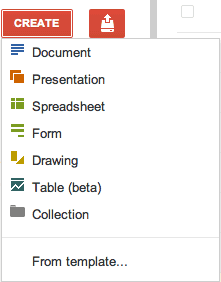
Aaron, a reader of this blog, spotted a new option in Google Docs: creating tables. It seems that Google Docs started to integrate with Fusion Tables, a little-known Google service that lets you manage large data sets.

I don't see "table (beta)" in Google Docs, so this could be a slow rollout or just a limited experiment. Fusion Tables already has a Google+ interface:

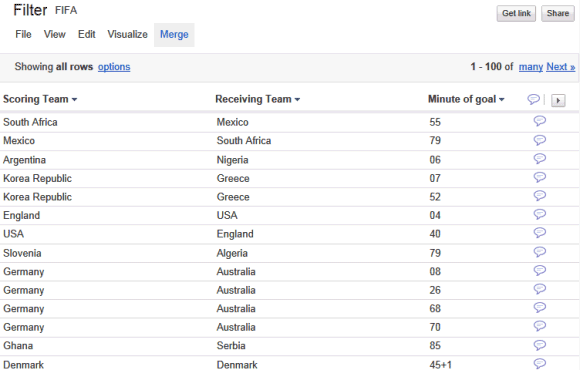
"Google Fusion Tables is a modern data management and publishing web application that makes it easy to host, manage, collaborate on, visualize, and publish data tables online." You can find some examples in the gallery. There are also many tutorials that help you create tables and turn them into maps.
{ Thanks, Aaron. }

I don't see "table (beta)" in Google Docs, so this could be a slow rollout or just a limited experiment. Fusion Tables already has a Google+ interface:

"Google Fusion Tables is a modern data management and publishing web application that makes it easy to host, manage, collaborate on, visualize, and publish data tables online." You can find some examples in the gallery. There are also many tutorials that help you create tables and turn them into maps.
{ Thanks, Aaron. }
New Advanced Image Search Page
Posted by R3ank at 6:26 AM 0 comments
Google updated the interface of the advanced image search page to look just like the corresponding Web search page. The redesigned page is easier to use, it groups the search options and includes some of the options that were only available in the sidebar.

Here's the old UI:

Why use the advanced search page instead of using the sidebar? Some of the options aren't available in the sidebar: restricting the results to a filetype, finding Creative Commons images, finding images from a domain or from a country.
There's one feature that's no longer available in the new interface. Can you find it?

Here's the old UI:

Why use the advanced search page instead of using the sidebar? Some of the options aren't available in the sidebar: restricting the results to a filetype, finding Creative Commons images, finding images from a domain or from a country.
There's one feature that's no longer available in the new interface. Can you find it?
iGoogle's New Interface
Posted by R3ank at 5:50 AM 0 comments
Google's personalized homepage has a new interface inspired by Google+. There's a prominent button for adding gadgets, a unified menu for gadgets that's hidden until you mouse over a gadget, an option to hide the sidebar and a bigger search box that supports voice search if you use Chrome. The links to the advanced search page and language tools page have been removed, while the "I'm Feeling Lucky" button is only displayed below the list of suggestions,


{ Thanks, Tim. }


{ Thanks, Tim. }
Hearts 'n Swirls
Posted by R3ank at 2:04 AM 0 comments
Morning hope you are all doing well. Too tired to blog last night, wasted so much time looking for a digi online and couldn't find what i was looking for. Probably out there but finally gave up and went to Google and found a colouring page. Will share tomorrow my card I made. My card today is for a friend, she's running late like me with her congrats, don't feel so bad now about my one being
Google Redirects Some Chrome Users to the Encrypted Search Interface
Posted by R3ank at 1:36 AM 0 comments
Google's encrypted version has all the features of the standard version and Google could redirect users to the more secure interface. You can now search images, use Google Instant, Instant Preview and other features that were missing from Google SSL. The navigation links are still missing and Google Maps doesn't support SSL yet.
A Google employee says that Google is "running an experiment with some percentage of Chrome 14 users where we send them to SSL search. The experience is meant to be completely comparable feature-wise to non-SSL search. It is independent of the Chrome 14 installation." So if you're using Chrome 14 Beta, you might be redirected to Google SSL.


"With Google search over SSL, you can have an end-to-end encrypted search solution between your computer and Google. This secured channel helps protect your search terms and your search results pages from being intercepted by a third party. This provides you with a more secure and private search experience," explains Google. An important downside is the loss of performance, but Chrome uses SPDY for all Google URLs, so SSL pages load a lot faster.
{ Thanks, Libran Lover. }
A Google employee says that Google is "running an experiment with some percentage of Chrome 14 users where we send them to SSL search. The experience is meant to be completely comparable feature-wise to non-SSL search. It is independent of the Chrome 14 installation." So if you're using Chrome 14 Beta, you might be redirected to Google SSL.


"With Google search over SSL, you can have an end-to-end encrypted search solution between your computer and Google. This secured channel helps protect your search terms and your search results pages from being intercepted by a third party. This provides you with a more secure and private search experience," explains Google. An important downside is the loss of performance, but Chrome uses SPDY for all Google URLs, so SSL pages load a lot faster.
{ Thanks, Libran Lover. }
Offline Google Docs
Wednesday, September 7, 2011 Posted by R3ank at 9:38 AM 0 comments
As promised, Google started to roll out the offline version of Google Docs, but don't expect too much. Much like the offline Gmail and offline Google Calendar, Google Docs works offline only if you use Chrome and install an app from the Chrome Web Store.
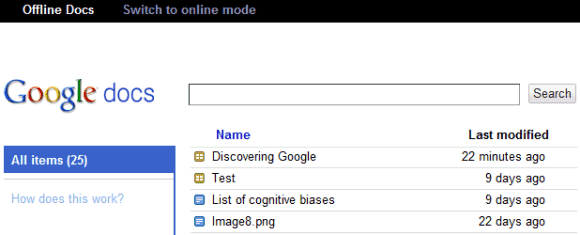
When you're offline, Google Docs shows a simplified interface that only lists the documents and spreadsheets that are cached. You can only view them, so most of the features from Google Docs menus are disabled.
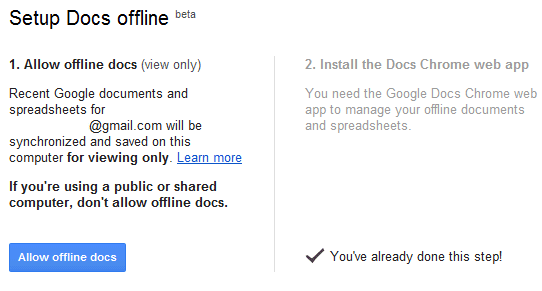
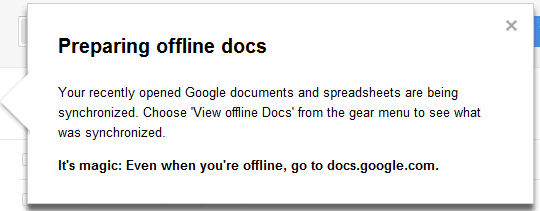
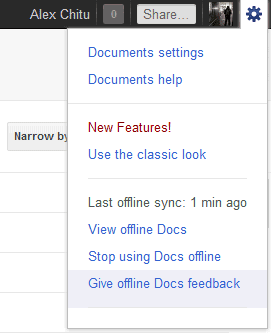
Just like the offline Gmail, Google Docs uses a different interface that can also be accessed when you're online if you go to: https://docs.google.com/offline/. "Offline access is available only for documents and spreadsheets. When you have Google Docs open and have an Internet connection, your most recently opened documents and spreadsheets will sync and become available offline. Presentations, drawings and other items are not currently available offline," explains Google.
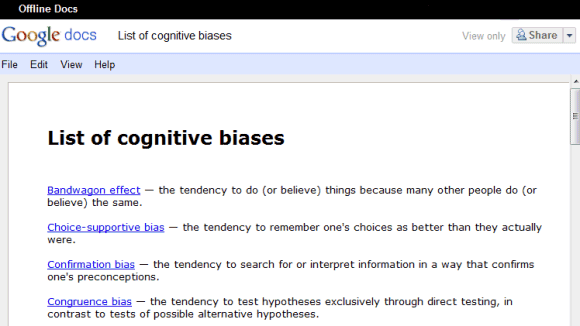
Another downside is that you can't edit your documents and spreadsheets, a feature that was available in the Gears implementation.
Right now, offline Google Docs is very limited and can only be used to access some of your documents and spreadsheets. It's interesting to notice that the apps powered by Gears were a lot more powerful and worked in other browsers: Firefox, Safari, IE. Maybe Google shouldn't have deprecated Gears and disabled the features that used Gears until the HTML5 implementations were good enough.
When you're offline, Google Docs shows a simplified interface that only lists the documents and spreadsheets that are cached. You can only view them, so most of the features from Google Docs menus are disabled.


Just like the offline Gmail, Google Docs uses a different interface that can also be accessed when you're online if you go to: https://docs.google.com/offline/. "Offline access is available only for documents and spreadsheets. When you have Google Docs open and have an Internet connection, your most recently opened documents and spreadsheets will sync and become available offline. Presentations, drawings and other items are not currently available offline," explains Google.

Another downside is that you can't edit your documents and spreadsheets, a feature that was available in the Gears implementation.

Right now, offline Google Docs is very limited and can only be used to access some of your documents and spreadsheets. It's interesting to notice that the apps powered by Gears were a lot more powerful and worked in other browsers: Firefox, Safari, IE. Maybe Google shouldn't have deprecated Gears and disabled the features that used Gears until the HTML5 implementations were good enough.
Subscribe to:
Posts (Atom)