DT creation for Simply Create
Sunday, December 5, 2010 0 comments
Just couldn't wait to have a play with these yummieeeee papers, this months goodies to play with from Simply Create. While on the subject, simply create has a challenge for us all so why not pop over and enter, fab prize up for graps. Have a thing about making the first cut into them but love what I have created. Kept looking at the grotesque little suitcase and didn't know where to start but

My Winter Wonderland!
0 comments
Sharing a little bit of my Winter Wonderland with you and over at Kaths blog, a little bit of fun (always up for that)and some goodies for the girl with the mostest or Buddies favourite snow scene if we don't measure up to her piccies. So here we goSome where taken yesterday and a couple today. Had a few showers today and my it's so cold again now. Going to tuck myself up on the sofa and watch
Makes a change from Christmas cards
0 comments
I can enter the following challenges :-
stamp on anything but white at
http://pennybfriendssaturdaychallenge.blogspot.com/
Anything at
http://letscreatechallenges.blogspot.com/2010/11/challenge-7-anything-goes.html
and
http://totallystampalicious.blogspot.com/
Birthday at
http://hodgepodgeshop.blogspot.com/2010/12/challenge-5-birthday-cards.html
and
http://4craftychicks.blogspot.com/
Enable the Default Web Apps in Chrome 8
Friday, December 3, 2010 0 comments
Google Chrome 8 has been launched, but where is the Web Store? It will be available soon. Google has already started to inform developers about the upcoming changes to the extensions gallery:
"These last few months, our team has been hard at work, preparing for the Chrome Web Store launch later this year. Extensions and themes for Google Chrome will be part of this new store."
While waiting for the Chrome Web Store launch, you can enable the apps section from the new tab page and install the 3 default web apps: Gmail, Google Calendar and Google Docs. Here's how to do that:
1. Close all Google Chrome windows.
2. In Windows, right-click on a Chrome shortcut from your desktop, select "Properties" and append the following text to the Target field: " --enable-default-apps" (don't use quotes, but don't forget to add a space before adding the command line flag). Click "OK" to close the dialog and then open Google Chrome.
On a Mac, quit Chrome, open the Terminal and paste this:
open /Applications/Google\ Chrome.app --args -enable-default-apps
For Linux you could use this:
/opt/google/chrome/google-chrome -enable-default-apps
3. Type chrome://extensions/ in the address bar (or click on the wrench menu and go to Tools > Extensions).
4. Click the "developer mode" link and then click "Update extensions now".
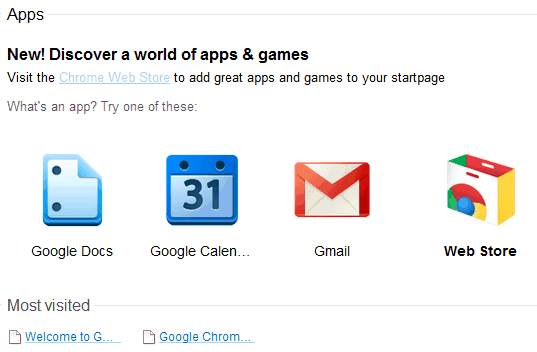
5. After less than a minute, your new tab page should look like this:
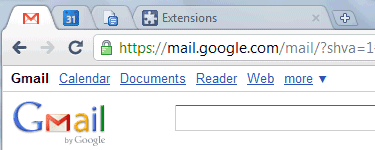
You can open the apps in regular tabs or you can right-click and select "open as pinned tab" or "open full screen".
"These last few months, our team has been hard at work, preparing for the Chrome Web Store launch later this year. Extensions and themes for Google Chrome will be part of this new store."
While waiting for the Chrome Web Store launch, you can enable the apps section from the new tab page and install the 3 default web apps: Gmail, Google Calendar and Google Docs. Here's how to do that:
1. Close all Google Chrome windows.
2. In Windows, right-click on a Chrome shortcut from your desktop, select "Properties" and append the following text to the Target field: " --enable-default-apps" (don't use quotes, but don't forget to add a space before adding the command line flag). Click "OK" to close the dialog and then open Google Chrome.
On a Mac, quit Chrome, open the Terminal and paste this:
open /Applications/Google\ Chrome.app --args -enable-default-apps
For Linux you could use this:
/opt/google/chrome/google-chrome -enable-default-apps
3. Type chrome://extensions/ in the address bar (or click on the wrench menu and go to Tools > Extensions).
4. Click the "developer mode" link and then click "Update extensions now".
5. After less than a minute, your new tab page should look like this:
You can open the apps in regular tabs or you can right-click and select "open as pinned tab" or "open full screen".
Why Google Maps Labels Look Better
0 comments
If you've ever wondered why Google Maps labels look more readable than the labels used by Bing Maps or Yahoo Maps, Justin O'Beirne has some answers.
"The white outlines of Google's city labels are thicker, and you can't see maps' background details (roads, rivers, etc.) behind them. (...) Google typically uses more classes of city labels, at a time, than the other two sites. (...) While the primary difference between each site’s city label classes is their size, Google takes this one step further by also using color to differentiate its city label classes. In that, the smallest city labels on Google’s maps are significantly lighter in color than the largest ones. These lighter labels, in turn, enable smaller cities to fade into background, while allowing the larger cities to stand out."

{ Image licensed as Creative Commons by Justin O'Beirne. }
"The white outlines of Google's city labels are thicker, and you can't see maps' background details (roads, rivers, etc.) behind them. (...) Google typically uses more classes of city labels, at a time, than the other two sites. (...) While the primary difference between each site’s city label classes is their size, Google takes this one step further by also using color to differentiate its city label classes. In that, the smallest city labels on Google’s maps are significantly lighter in color than the largest ones. These lighter labels, in turn, enable smaller cities to fade into background, while allowing the larger cities to stand out."
{ Image licensed as Creative Commons by Justin O'Beirne. }
Google Reader for Android
0 comments
Google Reader's mobile web app works really well and it has a great interface, so there aren't many reasons to create a native application for Google Reader. The main issue is that the application doesn't work offline, but this is a feature that could be easily implemented.
Instead of improving the mobile web app, Google decided to release a native Android app for Google Reader. The application supports multiple accounts, synchronizes your subscriptions and works offline. It also lets you search your feeds -- a feature that's inexplicably missing from the mobile web app.

Google Reader for Android uses infinite scrolling, has bigger touch areas, it integrates with the operating system's "send to" actions and has a neat trick in the settings that lets you navigate between articles using your phone's volume keys.

Instead of improving the mobile web app, Google decided to release a native Android app for Google Reader. The application supports multiple accounts, synchronizes your subscriptions and works offline. It also lets you search your feeds -- a feature that's inexplicably missing from the mobile web app.
Google Reader for Android uses infinite scrolling, has bigger touch areas, it integrates with the operating system's "send to" actions and has a neat trick in the settings that lets you navigate between articles using your phone's volume keys.
Light it up!
0 comments
I love these papers, Basic Grey, Jovial , just couldn't make up my mind which ones to use with this gorgeous stamp Sweet Dreams by Penny Johnston. Wanted to show as much as possible of the floral paper which wasn't easy considerating the size of the card and the image, really pleased with the final result. Hope the recipient loves it as much as I!
The roses I added a touch of glue and dipped
The roses I added a touch of glue and dipped
Subscribe to:
Posts (Atom)


