Restore Google Contacts

Friday, December 17, 2010 0 comments
One of the most annoying things about Google's contact manager is that it doesn't have a "trash" section. If you accidentally delete some of your contacts, it's impossible to retrieve them without a backup. This is a big problem if you use a buggy software that tries to sync your contacts, but manages to overwrite them.

Google tried to address this issue by adding a new option that lets you restore your contacts. You'll find it if you visit Google's contact manager and click on the "More actions" button. "You can restore your contact list to the state it was in at any point within the past 30 days. This is a great way to recover deleted contacts, undo an import, or undo a merge," explains Google.

While this is a very useful feature, Google's implementation doesn't help users who don't remember when they made a mistake. Google should have listed the most recent changes and allowed users to pick one of the revisions, like in Google Docs.


{ via Gmail blog }

Google Books Ngram Viewer

Thursday, December 16, 2010 0 comments
Google used some of the data obtained from 15 million scanned books to build Google Books Ngram Viewer.

"The datasets we're making available today to further humanities research are based on a subset of that corpus, weighing in at 500 billion words from 5.2 million books in Chinese, English, French, German, Russian, and Spanish. The datasets contain phrases of up to five words with counts of how often they occurred in each year. (...) The Ngram Viewer lets you graph and compare phrases from these datasets over time, showing how their usage has waxed and waned over the years," says Jon Orwant, from the Google Books team.


The nice thing is that the raw data is licensed as Creative Commons Attribution and can be downloaded for free. Maybe Google should use the same license for the Ngram database obtained from indexing the web.

Change Default Zoom Level in Google Chrome

0 comments
Google Chrome 9 lets you change the default zoom level for all pages, but this feature is more difficult to find because it's only available in the tab-based settings page. Here's how to change the zoom level:

1. Make sure that you use Google Chrome 9 (beta, dev), Google Chrome 10 (Canary) or a recent Chromium build. For example, you could type about: in the address bar.
2. Type about:flags in the address bar.
3. Click "Enable" next to Tabbed Settings and then click the "Restart" button at the bottom of the page. This will restart the browser.
4. Click the wrench menu and select Options.
5. Select Under the hood and pick a value from the "Page zoom" drop-down.


If you don't like Chrome's tabbed settings interface, you can go back to the standard settings dialog by disabling Tabbed Settings from about:flags. You won't lose the default zoom level, but you'll have to switch to the tabbed interface if you want to change it.

Bonus tip: Another option you can change from the tabbed settings interface is minimum font size (Under the hood > Web Content > Customize fonts > Minimum font size).

{ Thanks, Sterling. }

YouTube's Homepage Experiment

0 comments
YouTube tests a new version of its homepage that adds many useful features:
Combined list - Merges your subscriptions, friend activity, and recommendations into one easier-to-scan list
Don't miss a video - If a channel uploads 4 videos in a day, you'll see all 4 - instead of just the latest video
Delete anything - Hover over any video you don't want to watch and click 'x'
Or just grey it out - Videos you've already watched will be greyed out - so even without deleting, you'll know where you left off
Help me re-find stuff I just watched - Your homepage will include your recent likes and favorites so you can easily get back to them
Easy inbox - Links to your inbox (personal messages & comments) are front and center
Load much more - Watch older videos - all without leaving the homepage


YouTube wants to create a more comprehensive newsfeed that includes your actions and all the actions shared by your subscriptions and friends. Unfortunately, the homepage is no longer customizable.

{ Thanks, Sterling. }

Google Maps 5 for Android: 3D Maps and Offline Caching

0 comments
Google Maps 5 for Android comes with two features that make Google's mapping software a lot more useful. Google now uses vector graphics instead of map tiles and it caches some of your most frequently used maps so that they are available offline.

Vector-based maps allowed Google to add a lot of cool gestures:

Tilting: Drag down with two fingers to tilt the map. Tilt while zoomed in on one of the 100+ cities around the world with 3D buildings to see a skyline spring to life.

Rotating: Twist with two fingers to rotate the map. After tilting to see 3D buildings, rotate around them to gain a new perspective from any direction.

Smooth zooming: Slide two fingers together or apart, and see the map and labels continuously scale to any zoom level, stopping when your fingers stop.

Compass mode: Center the map on your location, and then tap the compass button in the top right corner. The map will flip into 3D mode and start rotating to match your perspective, while still keeping all the labels upright and readable.


The new 3D view makes maps more intuitive and easier to use, but that's not all. Since Google no longer has to download map images from its servers and vector-based maps require 100 times less data for all zoom levels, it's feasible to cache data. "Rather than having a static set of maps when installed, Maps will automatically start caching the areas you visit the most when your device is plugged in and connected to WiFi (e.g., the nightly charge)." You can't manually control caching, but it's an important first step toward an offline Google Maps.

Google also promises to add offline rerouting to Google Maps Navigation. "You'll still need a connection to start a route, but if you miss a turn along the way, we'll quickly get you back on track, even if you don't have an Internet connection."

Google Maps 5 for Android uses about 70% less data than the previous version, so it loads maps much faster. The new features require Android 2.0+, but not all devices support them. The list of devices that support all multi-touch gestures includes: Samsung Nexus S, Samsung Galaxy S, HTC G2, HTC Incredible, HTC Evo 4G and Motorola Droid/Droid 2/Droid X, while HTC Nexus One, HTC Desire, Sony Ericsson X10 and LG Ally don't support rotating gestures.

Chrome 9 Sandboxes Flash and Adds WebGL Support

0 comments
Google Chrome 9 beta is now available and, unlike the previous two versions, it comes with a lot of new features.

The built-in Adobe Flash plugin is now sandboxed, just like Chrome extensions and tabs. "The sandbox adds an additional layer of protection to further guard against malicious pages that try to hijack your computer or steal private information from your hard drive. Based on this groundwork in the beta, we'll be bringing the sandboxed Flash Player to Chrome for Mac and Linux in future releases as well," explains Google. Right now, the sandboxed Flash plugin is only available if you use Windows.


Google Chrome 9 enables WebGL support by default. "WebGL is a new web technology that brings hardware-accelerated 3D graphics to the browser without installing additional software" and it can be used to create cool applications like Google Body Browser, Field, Aquarium and more.


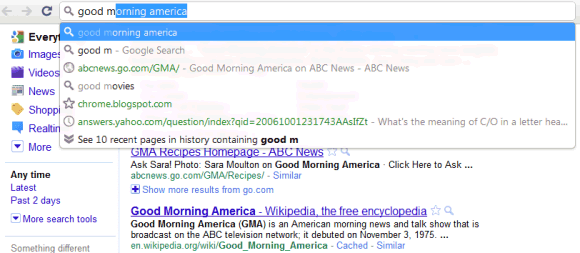
Chrome doesn't have many opt-in features. The latest feature that's not enabled by default is Instant Search, an extension of Google Instant that previews search results as you type and lets navigate to your favorite pages with only a few keystrokes. It might be useful to go to Gmail by just typing "m" in the address bar, but this feature could also be annoying if you actually wanted to visit miniclip.com. "The Instant feature can help you search and browse faster on the web by showing search results and webpages in the browser window as you type in the address bar, even before you press Enter. If you don't see the results you want, just keep typing and the results dynamically update," informs Google.

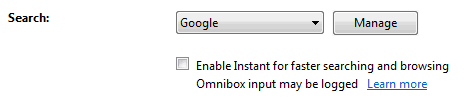
To enable Chrome Instant, go to Options > Basic and check "Enable Instant for faster searching and browsing".

Chrome Instant is not just annoying, it's also buggy. For example, Chrome's suggestions sometimes cover Google's first results.

Another new feature is the integration with Google Cloud Print, but there are no web apps or mobile applications that support this technology.

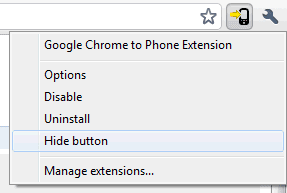
If you want to hide the button added by a Chrome extension, you can do it by right-clicking on the button and selecting "Hide button". When you change your mind, go to Tools > Extensions and click on "Show button" next to the corresponding extension.


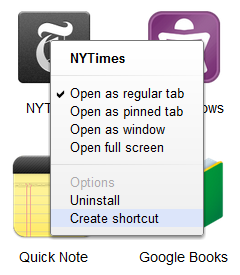
You can now create desktop shortcuts to your favorite web apps from the new tab page and open web apps in a new window.
To install Chrome 9 beta, visit this page. If you use Chrome 8 beta, open the About dialog to manually update.

A New Google Docs Interface

Wednesday, December 15, 2010 0 comments
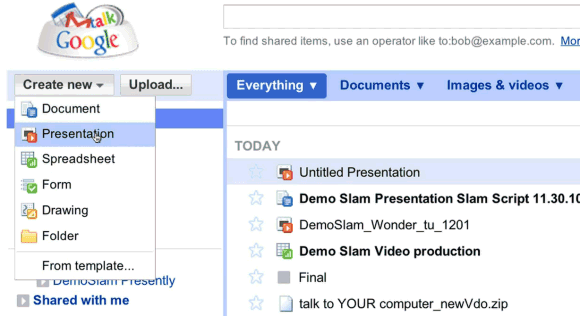
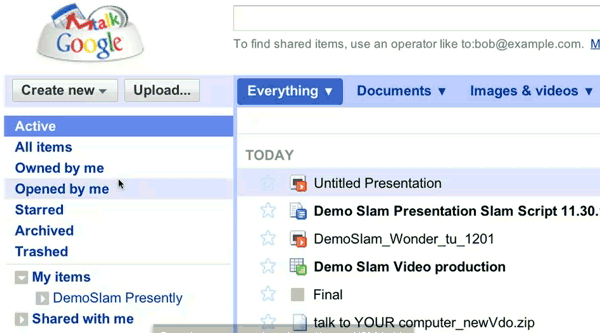
A recent Demo Slam video shows a new Google Docs interface that has separate sections for documents, images & videos and other files, new menu items for active and archived documents, a new navigation bar. Most likely, the new interface is tested internally at Google.


Here's the video:


{ spotted by Andrew }