Afternoon, hope your having a leisurely Sunday! Pretty quiet here at the mo so decided to have a little play after browsing some blogs, noticed the sketch over on Moving Along With The Times and this is what I came up with. A real quick Christmas card. Need to tidy up the mess I've now created, probably take longer than the card took lol!
http://movingalongwiththetimes.blogspot.com/ -
Google Groups Has a New Interface
Saturday, September 10, 2011 0 comments
Google Groups is the latest Google service redesigned to look like Google+. New buttons, new icons, new scrollbars, new search box and a smoother interface that makes Google's help forums look outdated.
Since the current Google Groups UI is inspired by Google Reader, we can expect to see a revamped Google Reader with a similar interface.
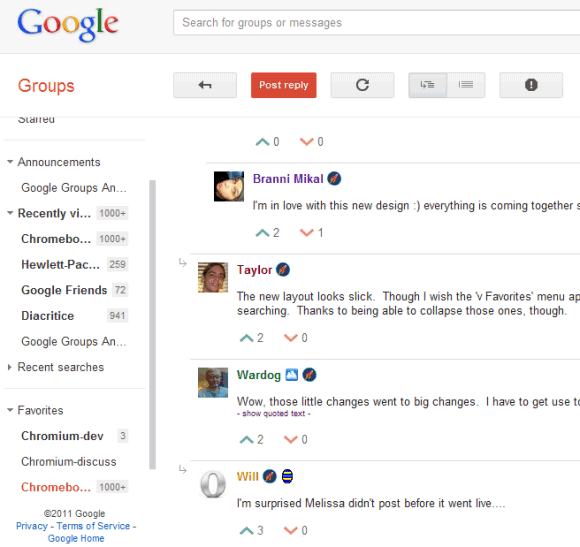
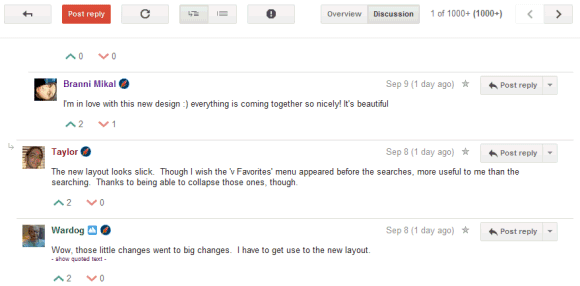
If you miss the small arrow that allowed you to hide the sidebar, use the "f" keyboard shortcut, which hides both the sidebar and the search box.
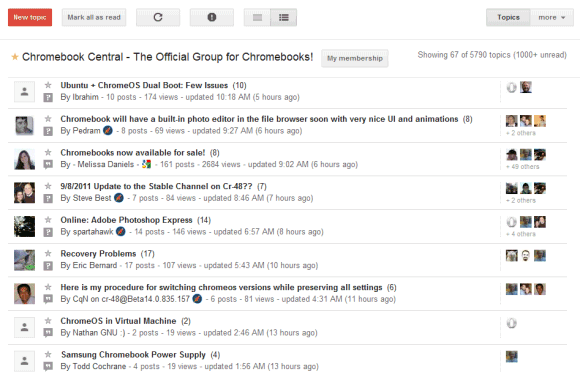
{ Thanks, Filipe, François and Elchanan. }
Since the current Google Groups UI is inspired by Google Reader, we can expect to see a revamped Google Reader with a similar interface.
If you miss the small arrow that allowed you to hide the sidebar, use the "f" keyboard shortcut, which hides both the sidebar and the search box.
{ Thanks, Filipe, François and Elchanan. }

Magical Time!
0 commentsMorning folks, been playing again with another Sugar Nellie stamp, love the new edfitions for Christmas and teamed her up with Fiskars Christmas papers and Th Weather Clock. Coloured her with Promarkers, glamour dusted the weather clock and computerised sentiment to finish.
Fiskars Christmas papersSugar Nellie - Crystal FlakesTH Weathered Clock
Embossing folder snow flurrySnowflake
Jimmy's big month
Thursday, September 8, 2011 0 comments
Jimmy started 1st grade. He actually started it over a month ago (August 1st, can you believe how early it starts out here?!) He enjoys his school and teacher a lot. He's making new friends. He tells me just about every day that "I get girls to chase me" when I ask him what he did during recess.

Here's a pic on his second day. Yes, not only am I a mother that fails to post cute pics of her child's first day of school in a timely manner, I am also a mother that failed to take pictures on the very first day. The camera did finally come out a day late, so technically these are pictures of his "day 2 of grade 1":
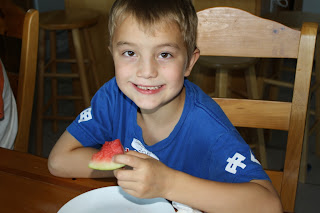
Another big thing that happened this past month was that on the 15th of August, he lost his first tooth! He was eating a piece of watermelon at dinner, and out popped one of his front tooth on the bottom. A couple days later, the other one popped out. He sure feels "cool" with his missing teeth down there now.
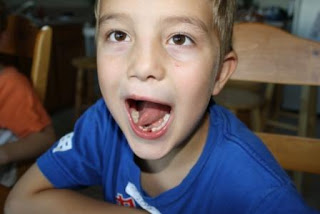
Johnny was really funny and wanted to buy the tooth off of Jimmy right off the bat. He was offering Jimmy a whole dollar, and for a while, Jimmy was going to sell it to him. Then he realized he wouldn't be able to stick it under his pillow and experience the "tooth fairy" without the tooth, so he opted out of the deal in the end. Johnny kept on threatening to take it from under his brother's pillow, that rascal!

Here's a pic on his second day. Yes, not only am I a mother that fails to post cute pics of her child's first day of school in a timely manner, I am also a mother that failed to take pictures on the very first day. The camera did finally come out a day late, so technically these are pictures of his "day 2 of grade 1":

Another big thing that happened this past month was that on the 15th of August, he lost his first tooth! He was eating a piece of watermelon at dinner, and out popped one of his front tooth on the bottom. A couple days later, the other one popped out. He sure feels "cool" with his missing teeth down there now.

Johnny was really funny and wanted to buy the tooth off of Jimmy right off the bat. He was offering Jimmy a whole dollar, and for a while, Jimmy was going to sell it to him. Then he realized he wouldn't be able to stick it under his pillow and experience the "tooth fairy" without the tooth, so he opted out of the deal in the end. Johnny kept on threatening to take it from under his brother's pillow, that rascal!
Knitted with Love!
0 comments
Friday's come around so fast once again. Have tidied my craft area in the Sunroom up for the weekend. There'll be no time to craft, been on a roll these past few weeks and loved every moment of it. Family all home and silaging this weekend so will be kept busy in the Kitchen cooking. Grandkids will be here too, I bought them a game to play with, well really I want to play it! Mr Potato Head so
iPhone App for Blogger
0 comments
Blogger has an app for iPhone and it's better than the corresponding Android app, which has improved a lot in the past months. Both apps let you edit your existing posts and create new posts, add images to your posts, include labels and geolocate your posts.
They're pretty basic, but the iPhone app has a better interface, it's easier to use and pays attention to detail. For example, the iPhone app includes the URL of the blog next to the name when you switch to a different blog, so that it's easier to identify a blog. The Android app only shows the names. To publish a post in the iPhone app, you need to tap the "Publish" button, which is always displayed at the top of the screen. In the Android app you need to scroll to the bottom of the post to find the "publish" button.
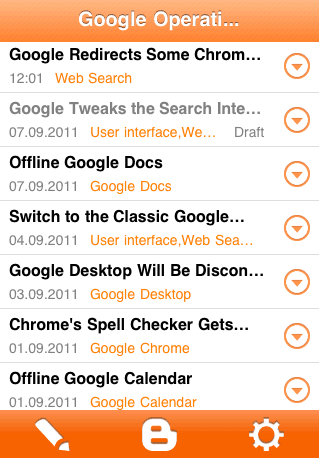
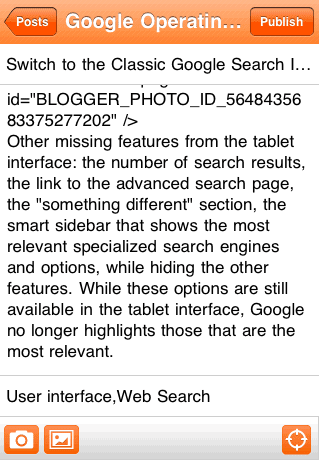
"With the Blogger app, you can write a new blog post and publish it immediately or save it as a draft right from your iOS device. You can also open a blog post you've been working on from your computer and continue editing it while you're on-the-go. Your blog posts are automatically synced across devices, so you’ll always have access to the latest version," informs Google.
They're pretty basic, but the iPhone app has a better interface, it's easier to use and pays attention to detail. For example, the iPhone app includes the URL of the blog next to the name when you switch to a different blog, so that it's easier to identify a blog. The Android app only shows the names. To publish a post in the iPhone app, you need to tap the "Publish" button, which is always displayed at the top of the screen. In the Android app you need to scroll to the bottom of the post to find the "publish" button.
"With the Blogger app, you can write a new blog post and publish it immediately or save it as a draft right from your iOS device. You can also open a blog post you've been working on from your computer and continue editing it while you're on-the-go. Your blog posts are automatically synced across devices, so you’ll always have access to the latest version," informs Google.
Customize Google Docs Interface
0 comments
If you switched to the new Google Docs interface and wondered why there's so much whitespace, I have a good news for you: Google Docs has two new options for adjusting display density. Click the new settings drop-down and select one of the three options: comfortable (the default option), cozy and compact (similar to the old interface). My favorite option is "cozy", which is both clean and compact.
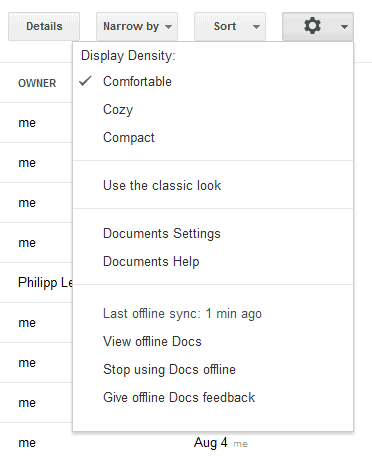
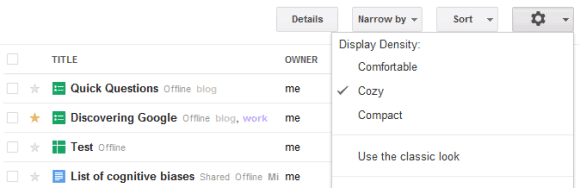
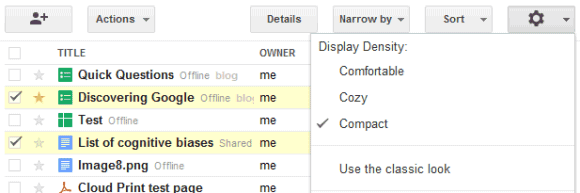
Another change is that the details pane is no longer a sidebar. If you want to find more information about a document, select it and click "Details". Google Docs will display an overlay that includes a large thumbnail, sharing information, the list of collections where you placed the document and some other information.
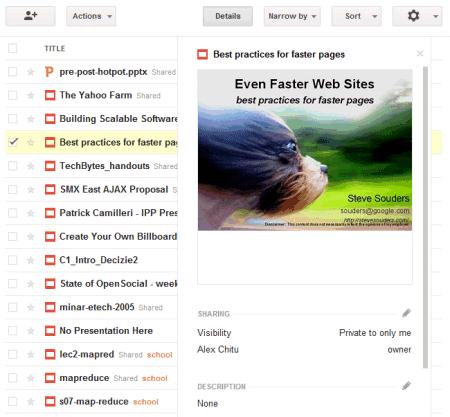
There's also a button for sharing the selected documents and some new icons for documents, spreadsheets, drawings, presentation and other files.
{ Thanks, Tom. }
Another change is that the details pane is no longer a sidebar. If you want to find more information about a document, select it and click "Details". Google Docs will display an overlay that includes a large thumbnail, sharing information, the list of collections where you placed the document and some other information.
There's also a button for sharing the selected documents and some new icons for documents, spreadsheets, drawings, presentation and other files.
{ Thanks, Tom. }
Subscribe to:
Posts (Atom)


