My second DT card for By The Cute & Girly. Half way through the month still plenty time to play along with our theme All Things Bright And Beautiful. My card was snapped up by my youngest son for his girlfriend. Mum doesn't have save them money in that department, pity couldn't keep him on the staight and narrow with the rest of his spending. Wonder where he gets that from!
LOTV
More Options for Google Flight Search
0 comments
Google Flight Search has a homepage, is now included in the search sidebar and offers more options, but only for US locations. Search Engine Land reports that "this is the first product to emerge from Google's controversial acquisition of travel software company ITA, which closed in April".
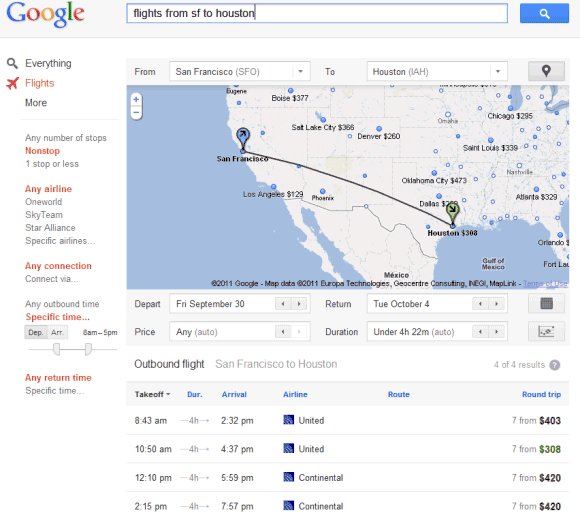
If you search for [flights from San Francisco to Houston] and choose "Flights" from the sidebar, Google shows a list of flights and lets you filter them by the number of stops, airline, outbound time, price and duration of flight.
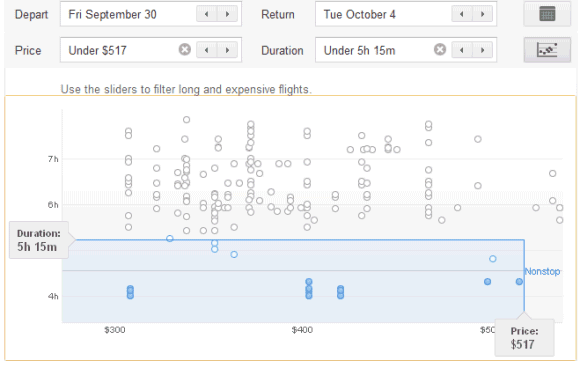
There's also a dynamic map that lets you change your destination and a smart chart for filtering long and expensive flights. Just click the "limits" button and use the sliders to customize the filters. By default, Google only shows the best flights.
If you click the arrows from the From or To drop-downs, you can select some of the nearby airports. You can also enter multiple locations separated by commas.
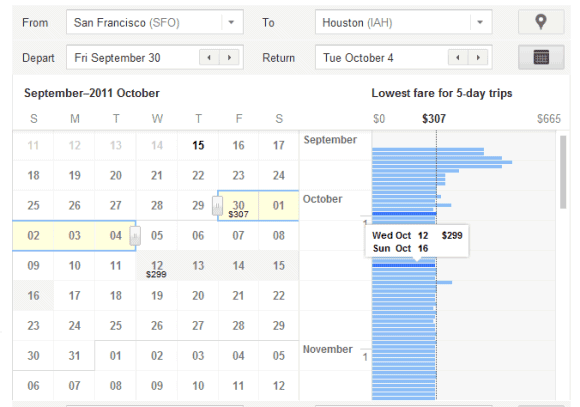
The calendar is also smart because it lets you find the cheapest flights and plan your trips accordingly.
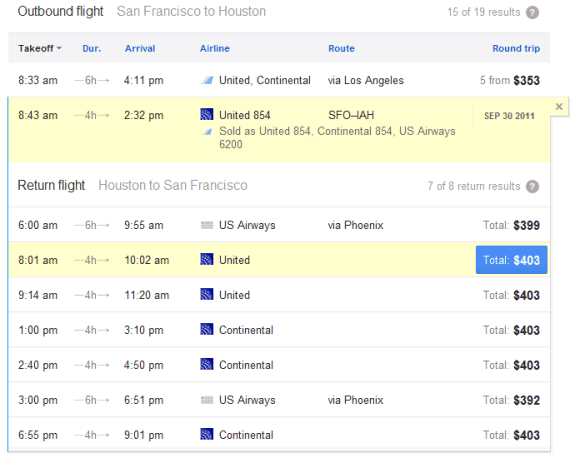
Once you've picked an outbound flight, you can also choose a return flight. Google sends you to the airline sites to book your flights, but it's interesting to notice that the links are labeled as ads.
"This is just an early look: the takeoff, not the final destination! You may notice that at the moment we include a limited number of U.S. cities and show results for round-trip economy-class flights only. We're working hard to improve this feature and look forward to sharing more updates," explains Google.
For locations outside of US, Google still shows a static OneBox with a list of flights, but this tool is not interactive. For some reason, Google shows the same OneBox if you enter US locations and doesn't link to the advanced flight search engine.
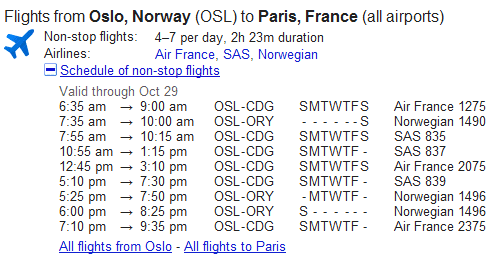
Update. Philip Cunningham, an eagle-eyed reader, spotted a mistake: the link to Recipe Search is spelled "receipts" in Flight Search. Another mistake is that Google still shows icons next to the specialized search options.
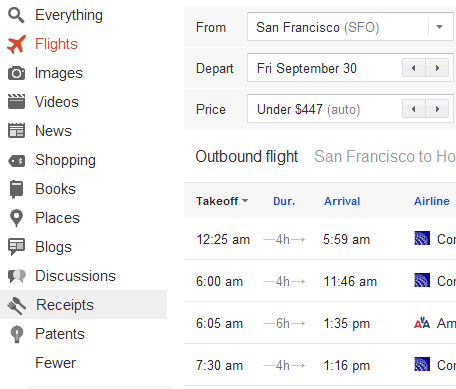
If you search for [flights from San Francisco to Houston] and choose "Flights" from the sidebar, Google shows a list of flights and lets you filter them by the number of stops, airline, outbound time, price and duration of flight.
There's also a dynamic map that lets you change your destination and a smart chart for filtering long and expensive flights. Just click the "limits" button and use the sliders to customize the filters. By default, Google only shows the best flights.
If you click the arrows from the From or To drop-downs, you can select some of the nearby airports. You can also enter multiple locations separated by commas.
The calendar is also smart because it lets you find the cheapest flights and plan your trips accordingly.
Once you've picked an outbound flight, you can also choose a return flight. Google sends you to the airline sites to book your flights, but it's interesting to notice that the links are labeled as ads.
"This is just an early look: the takeoff, not the final destination! You may notice that at the moment we include a limited number of U.S. cities and show results for round-trip economy-class flights only. We're working hard to improve this feature and look forward to sharing more updates," explains Google.
For locations outside of US, Google still shows a static OneBox with a list of flights, but this tool is not interactive. For some reason, Google shows the same OneBox if you enter US locations and doesn't link to the advanced flight search engine.
Update. Philip Cunningham, an eagle-eyed reader, spotted a mistake: the link to Recipe Search is spelled "receipts" in Flight Search. Another mistake is that Google still shows icons next to the specialized search options.

Dash, Google's Alternative to JavaScript
Tuesday, September 13, 2011 0 comments
An internal Google document from October 2010 provides some information about Google's strategy for the future of JavaScript. Google will continue to work on improving JavaScript and adding new features to ECMAScript Harmony, but it will also develop a new language called Dash that will try to solve JavaScript's problems, while offering better performance, the ability "to be more easily tooled for large-scale projects" and better security features.
Google also develops a cloud IDE called Brightly that will probably the first app written in Dash. The Dash VM and Dash Cross Compiler could be available later this year, according to the document.
"Our approach is to make an absolutely fantastic VM/Language and development environment and build great apps that fully leverage it in order to help other browsers see the wisdom in following. Once Dash has had a chance to prove its stability and feasibility, we are committed to making Dash an open standard with involvement from the broader web community," explains Google.
Update (October 10): The language is called Dart.
{ via Reddit }
The goal of the Dash effort is ultimately to replace JavaScript as the lingua franca of web development on the open web platform. We will proactively evangelize Dash with web developers and all other browser vendors and actively push for its standardization and adoption across the board. This will be a difficult effort requiring finesse and determination, but we are committed to doing everything possible to help it succeed.
While Dash is catching on with other browsers, we will promote it as the language for serious web development on the web platform; the compiler allows such developers to target other browsers before those browsers implement Dash.
The Dash language effort will be driven by Lars Bak and his team in the Aarhus office.
Google also develops a cloud IDE called Brightly that will probably the first app written in Dash. The Dash VM and Dash Cross Compiler could be available later this year, according to the document.
"Our approach is to make an absolutely fantastic VM/Language and development environment and build great apps that fully leverage it in order to help other browsers see the wisdom in following. Once Dash has had a chance to prove its stability and feasibility, we are committed to making Dash an open standard with involvement from the broader web community," explains Google.
Update (October 10): The language is called Dart.
{ via Reddit }
Google Chrome's New Bookmarks UI
0 comments
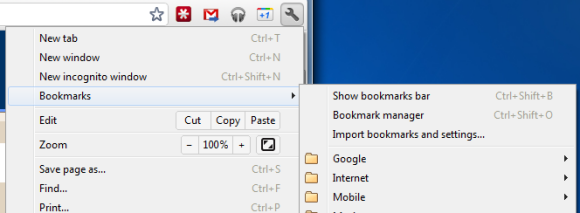
Google Chrome 15 brings some new ways to access your bookmarks. There's a new bookmarks menu below the "new incognito window" option that lets you quickly find your bookmarks. This feature is already available in Chrome 14 (now in beta), but the bookmarks menu is more prominently displayed in Chrome 15.
The new tab page no longer includes the bookmarks bar if this feature is disabled. The main reason for removing the bar is that the new tab page now includes a special section for bookmarks, next to the sections for apps and frequently visited pages. Bookmarks are displayed just like apps, but the thumbnails are much smaller and they seem to be blank, at least for now. You can now drag bookmarks to the list of apps, reorder them or remove them without using the bookmark manager.
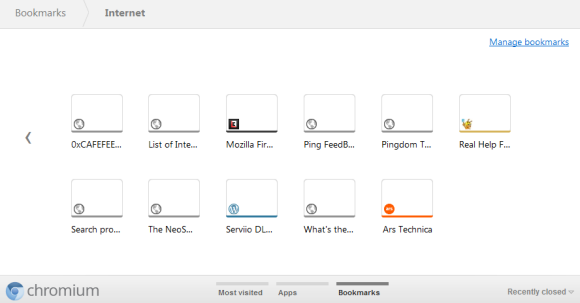
While there are many advantages to the new interface for browsing and managing bookmarks, the thumbnail view is not very useful if you have a lot of bookmarks in a folder. Page titles are truncated to the first 10-15 characters and it's not always easy to find a bookmark. A list view is more space-efficient.
The new tab page no longer includes the bookmarks bar if this feature is disabled. The main reason for removing the bar is that the new tab page now includes a special section for bookmarks, next to the sections for apps and frequently visited pages. Bookmarks are displayed just like apps, but the thumbnails are much smaller and they seem to be blank, at least for now. You can now drag bookmarks to the list of apps, reorder them or remove them without using the bookmark manager.
While there are many advantages to the new interface for browsing and managing bookmarks, the thumbnail view is not very useful if you have a lot of bookmarks in a folder. Page titles are truncated to the first 10-15 characters and it's not always easy to find a bookmark. A list view is more space-efficient.
Delicious!
0 comments
Morning to you all, I think it could be a crafty day here lol! A bit weary after my weekend so a bit slow off the mark at the mo. My card today is using Pennyblack stamp Sweet Thing, coloured with Promarkers and sprinkles of Glamour Dust. The papers are frome Dovecraft Tea Party.
The card is going to my daughter-in-law Kelly. Just to remind her, the sooner she creates her career in cake
The card is going to my daughter-in-law Kelly. Just to remind her, the sooner she creates her career in cake
Google Drive, a New Name for the Google Docs Homepage?
0 comments
TechCrunch has recently reported that the subdomain drive.google.com has been added to a Chrome file and a Google Docs message includes a reference to Google Drive.

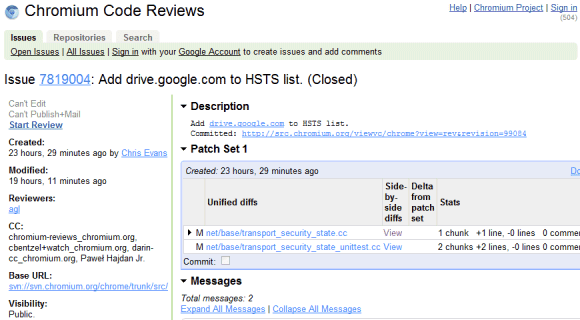
The source code of Google Docs files has many messages related to "Google Drive", but all of them have one thing in common: they replace similar messages that include "Documents List". Here are two examples: "items haved been removed from your Documents List" / "items haved been removed from your Google Drive", "Add to my Documents List" / "Add to My Google Drive".
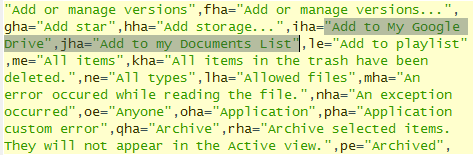
This suggests that Google Drive could be the new name of the Google Docs List, while Google Docs could be detached from the file storage interface and only be an online office suite. Google Docs is not the right name for an online storage application that lets you upload not just documents, but also music, videos, archives, photos and other files. Hopefully, the rebranding will bring more free storage, file syncing apps for mobile and desktop and integration with third-party apps.
Steven Levy's "In the Plex" included an interesting story about Google Drive being superseded by Google Docs because "files are so 1990". Google's Sundar Pichai said that "when people use our Google Docs, there are no more files. You just start editing in the cloud, and there's never a file." Google Drive might be a better name for a service that stores user files, whether they're created using Web apps, mobile apps or desktop apps.
The source code of Google Docs files has many messages related to "Google Drive", but all of them have one thing in common: they replace similar messages that include "Documents List". Here are two examples: "items haved been removed from your Documents List" / "items haved been removed from your Google Drive", "Add to my Documents List" / "Add to My Google Drive".
This suggests that Google Drive could be the new name of the Google Docs List, while Google Docs could be detached from the file storage interface and only be an online office suite. Google Docs is not the right name for an online storage application that lets you upload not just documents, but also music, videos, archives, photos and other files. Hopefully, the rebranding will bring more free storage, file syncing apps for mobile and desktop and integration with third-party apps.
Steven Levy's "In the Plex" included an interesting story about Google Drive being superseded by Google Docs because "files are so 1990". Google's Sundar Pichai said that "when people use our Google Docs, there are no more files. You just start editing in the cloud, and there's never a file." Google Drive might be a better name for a service that stores user files, whether they're created using Web apps, mobile apps or desktop apps.
Google Tweaks the Search Interface
0 comments
After a few weeks of testing various changes to the search results pages, Google redesigned the interface and added some of the experimental features. The search options sidebar no longer uses icons, there's a new section that displays the service's name ("Search") and the number of search results.
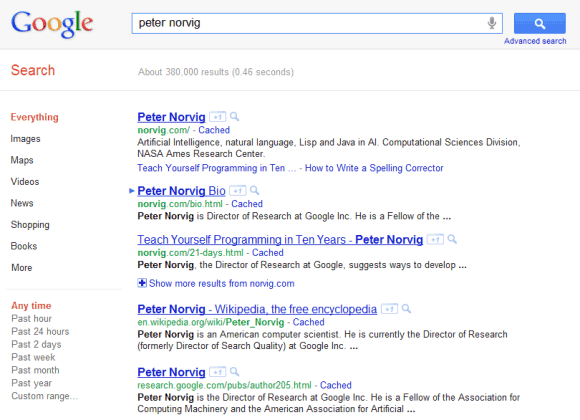
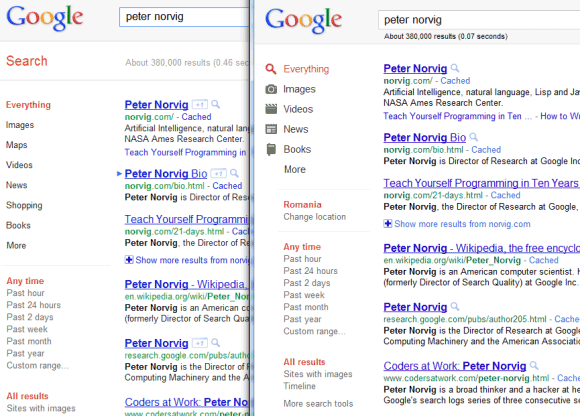
Google also tweaked the colors of the links and URLs, as you can see in the image above, which compares the new interface (left) with the old interface (right).
Google also tweaked the colors of the links and URLs, as you can see in the image above, which compares the new interface (left) with the old interface (right).
Subscribe to:
Posts (Atom)
