
Gmail's New Look, Now Available
0 comments
After almost two weeks since the last post about the new Gmail interface, you can now try it. Open Gmail and you should see a message at the bottom of the page that invites you to "switch to the new look".
Gmail's new look is based on the "Preview" theme, but it's much more than a theme. There are a lot of changes: Contacts and Tasks are now included in a drop-down menu below the Gmail logo, buttons like Archive or Label are only displayed when you select at least one message, there's a new settings menu that lets you change the display density, gadgets and the chat box are now resizable, there's a new interface for conversations, advanced search options are now displayed when you click the arrow in the search box and you can try HD themes.
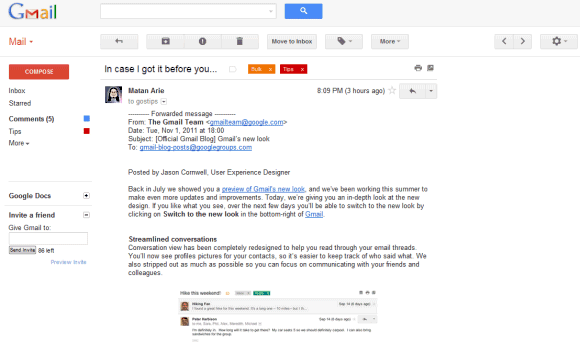
For now, you can switch to the old interface from the settings menu, but Google says that this option will be removed soon.
{ via Gmail's blog }
Gmail's new look is based on the "Preview" theme, but it's much more than a theme. There are a lot of changes: Contacts and Tasks are now included in a drop-down menu below the Gmail logo, buttons like Archive or Label are only displayed when you select at least one message, there's a new settings menu that lets you change the display density, gadgets and the chat box are now resizable, there's a new interface for conversations, advanced search options are now displayed when you click the arrow in the search box and you can try HD themes.
For now, you can switch to the old interface from the settings menu, but Google says that this option will be removed soon.
{ via Gmail's blog }

My BTC&G Blog Hop Winner
0 comments
Evening folks, Returning with the winner of my Spesch Digital Design voucher from By The Cute & Girly Blog Hop. First I would love to thank you all for joining in and for all the lovely comments you left. Right, won't keep you any longer, it's LISA ( http://crunchiecrafts.blogspot.com/). Congratulations Lisa. Contact Lora over on the challenge blog and she will get your prize to you.
x
x
More About Google Drive
0 comments
Google Drive is just a new name for Google Docs, so you shouldn't expect a new service. What you can expect is a new software that synchronizes your files with Google Docs and more free storage.
Felipe Zorzo found an evidence (English translation) that Google Drive is also the name of a downloadable software. The clue is a new menu item titled "Download Google Drive" that's disabled by default. To enable it, Felipe opened Google Docs, then loaded Chrome's Developer Tools, switched to the Scripts tab and searched for cookieFetchElement. He clicked on the row number (365) to set a breakpoint, reloaded Google Docs, went back to the Developer Tools and pasted the following code in the console:
config.ed = true; config.ddu = '.';
After going back to the Scripts tab, he clicked the "pause" button (F8) and switched to the Google Docs tab.


At the moment, you can't download the Google Drive software, but it will be interesting to see if it's better than Dropbox.
{ Thanks, Rodrigo. }
Felipe Zorzo found an evidence (English translation) that Google Drive is also the name of a downloadable software. The clue is a new menu item titled "Download Google Drive" that's disabled by default. To enable it, Felipe opened Google Docs, then loaded Chrome's Developer Tools, switched to the Scripts tab and searched for cookieFetchElement. He clicked on the row number (365) to set a breakpoint, reloaded Google Docs, went back to the Developer Tools and pasted the following code in the console:
config.ed = true; config.ddu = '.';
After going back to the Scripts tab, he clicked the "pause" button (F8) and switched to the Google Docs tab.
At the moment, you can't download the Google Drive software, but it will be interesting to see if it's better than Dropbox.
{ Thanks, Rodrigo. }
By The Cute And Girly November Challenge/ Christmas Girls
0 commentsAfternoon Folks,a big thank you to you all for helping us celebrate out Birthday challenge last month. So many lovely cards entered with our Anything Goes challenge. Remember to check back and see if you are a winner over on the challenge blog later. I will be back later with my winner of the Spesch Designs voucher. Onto this month and it's my turn to choose. It's Christmas Girls, so many
A Better Way to Share Posts in Google Reader
0 comments
Brian Shih, a former Google Reader Product Manager, says that the latest Reader update is "a disaster". One of the reasons could be that most of the initial members of the Reader team left Google and the new team doesn't understand the goal of the product.
"It's as if whoever made the update did so without ever actually using the product to, you know, read something. Reader is a product built to consume information, quickly. We designed it to be very good at that one thing. G+ is an experience built around browsing (similar to Facebook) and socializing. Taking the UI paradigm for G+ and mashing it onto Reader without any apparent regard for the underlying function is awful and it shows," says Brian.
One of Brian's complaints is that it's a lot more difficult to share a post in the new interface. Instead of clicking "Share" or using a keyboard shortcut, you now have to click "+1", then click "Share on Google+", select your audience and then click the "Share" button. There's also a privacy downside: +1's are public, even if you only want to share a post with one or two people.
Fortunately, there's a way to share a post without first clicking +1, but it's not obvious. Just use the "share" box from Google's navigation bar.

{ via François }
"It's as if whoever made the update did so without ever actually using the product to, you know, read something. Reader is a product built to consume information, quickly. We designed it to be very good at that one thing. G+ is an experience built around browsing (similar to Facebook) and socializing. Taking the UI paradigm for G+ and mashing it onto Reader without any apparent regard for the underlying function is awful and it shows," says Brian.
One of Brian's complaints is that it's a lot more difficult to share a post in the new interface. Instead of clicking "Share" or using a keyboard shortcut, you now have to click "+1", then click "Share on Google+", select your audience and then click the "Share" button. There's also a privacy downside: +1's are public, even if you only want to share a post with one or two people.
Fortunately, there's a way to share a post without first clicking +1, but it's not obvious. Just use the "share" box from Google's navigation bar.
{ via François }
Read Your Shared Items in Google Reader
0 comments
The latest Google Reader update removed all the social features, including the section that allowed you to read the items you've shared. Fortunately, the shared items page is still available at http://www.google.com/reader/shared/username (replace username with your Gmail username) and you can subscribe to this page in Google Reader, but only if the page was public. Click "subscribe" and paste the URL of the shared items page. If you don't have a Gmail account, load the shared items feed in Reader, right-click "Your shared items" and copy the URL.
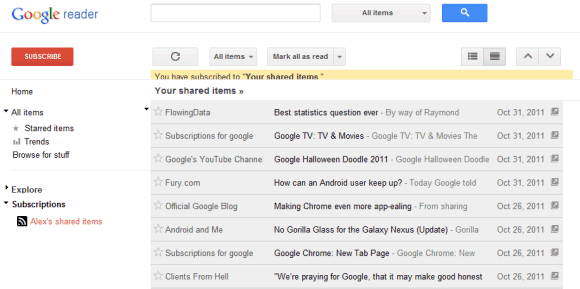
You can now use Google Reader's search box to find a post you've shared. Click the "All items" drop-down next to the search box, scroll down to the end of the list (or just press "End") and you'll find the shared items feed.
To unsubscribe from this feed, you need to go to the settings page, click "Subscriptions", type "shared items" in the search box and click the "unsubscribe button".
You can now use Google Reader's search box to find a post you've shared. Click the "All items" drop-down next to the search box, scroll down to the end of the list (or just press "End") and you'll find the shared items feed.
To unsubscribe from this feed, you need to go to the settings page, click "Subscriptions", type "shared items" in the search box and click the "unsubscribe button".
Subscribe to:
Posts (Atom)


